
.png)
Learn how presales is evolving and howyour team can stay ahead in atech-driven sales landscape.

To build an enterprise intent strategy from product demo engagement, you need four things: an interactive demo environment that produces trackable behavioral signals, a shared framework that weights those signals by deal relevance, a webhook connection that routes key events into your CRM, and follow-up triggered by actual buyer behavior instead of cadence timing. In enterprise sales, where Gartner puts the typical buying group at 6 to 10 decision-makers and cycles stretch across months, demo engagement is deal intelligence: it tells you not just that an account is interested, but what specific buyers care about once they see your product. This guide covers the seven steps to turn it into a working system.
TL;DR
An enterprise intent strategy is a structured approach to identifying which accounts are in an active buying cycle, which stakeholders are driving the evaluation, and what signals indicate readiness for the next sales action.
The important distinction is between top-of-funnel intent and purchase intent. Third-party signals, review site research, topic surge data, category browsing, indicate interest and potential need. They are business development intelligence: genuinely useful for prospecting, prioritizing accounts, and timing initial outreach. What they cannot tell you is what a specific buyer cared about when they saw your product.
That is where demo engagement comes in. When a prospect completes a use-case demo, replays the security module, or a second stakeholder from the same company opens the demo, they are generating first-party, product-level purchase intent data. This is deal intelligence, and by its nature it has to come from your own interactions with the buyer and the buying committee. No external data provider can see inside your deals.
The two are not in competition. Third-party data works higher up the funnel. Demo engagement takes over once the buyer is actually evaluating you, which is where enterprise deals are won or lost. This guide covers the system for the second half. For the tactical layer, which signals to read and how a rep uses them before a specific call, see our guide to surfacing buyer intent signals from demo engagement.
Before you configure a single workflow, align your revenue team on which signals you are tracking and what each one means. Without this alignment, sales and presales will interpret the same data differently and act on it inconsistently.
Distinguish signal sources cleanly. First-party signals come from your own environments and campaigns: demo engagement, website behavior, your ad campaign data, email interactions, form submissions. Third-party signals come from outside sources you do not own: review site visits and topic surge data from intent providers. Each type serves a different funnel stage and requires a different response playbook.
The full signal taxonomy, stage mapping, and the scoring model with weights and thresholds live in our buyer intent signals guide. At the strategy level, three decisions matter here:
Define your minimum intent threshold. Set a specific engagement score or signal combination that qualifies an account for the next sales action. This prevents reps from acting on noise rather than genuine buying momentum.
Document the framework in a shared rubric. If presales and sales define "high intent" differently, leads get routed and followed up inconsistently. A shared definition owned by both teams is the foundation everything else depends on.
Assign an owner. Someone in RevOps or presales leadership needs to own the rubric, review it quarterly against closed-won data, and arbitrate when teams disagree about what a signal means.
Intent signals are only as reliable as the demo format generating them. This is a fidelity question: a video demo or a screenshot deck produces a view count and little else. An interactive demo captured at the HTML level produces step-level behavioral data, which screens a buyer visited, how long they stayed, what they replayed, where they left. That difference is the entire foundation of this strategy. If your demos cannot produce granular engagement data, there is nothing to build an intent system on.
Audit your core product flows before building anything. Identify the three to five workflows enterprise buyers evaluate most, typically those tied to security, scalability, or integration capabilities. These sections generate the most valuable intent signals.
Segment your demo environment by persona. A VP of Engineering explores different product areas than a CFO. Persona-specific demo tracks let you see which stakeholder group engages with which content, which becomes critical when reading multi-stakeholder buying committees.
Remove sensitive or environment-specific data before publishing demos. Enterprise buyers notice inconsistencies. A polished, realistic demo environment builds the trust longer sales cycles require and produces cleaner engagement signals.
Keep demos current. When your product updates, demos reflecting an older version produce misleading engagement data. Stale demos are a signal quality problem, not just a branding problem. Make demo review a recurring team task, and use naming conventions and Demo Tags to keep the library organized so outdated assets are easy to spot and retire.
With Demoboost, demo environments are captured at the HTML level via Chrome extension, so every shared demo produces step-level engagement data: time spent, sections viewed, replays, and return visits, all available in demo analytics.
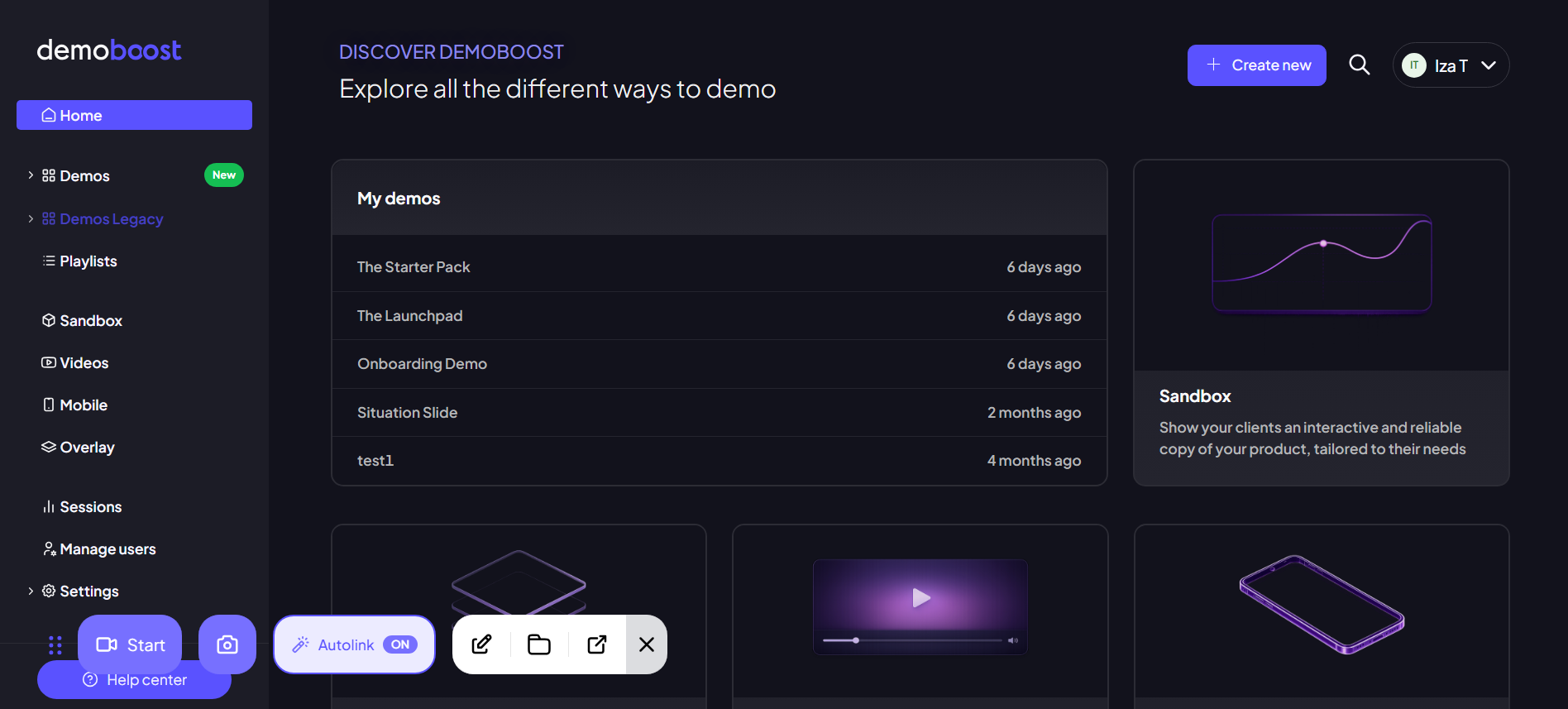
Demoboost captures demos at the HTML level, with Global Linking allowing teams to update a shared screen once and propagate changes across every demo that references it.
Once your demos are producing granular engagement data, the next step is assigning meaning to what buyers do. Not all demo interactions carry equal weight. A prospect spending three minutes on your security module signals something different than someone clicking through your onboarding flow in 30 seconds.
This weighting is an interpretation framework your team applies when reading demo analytics, not an automated tagging system. Build it in three moves:
List the product areas in your demos and rank them by deal relevance. Security modules, integration walkthroughs, and admin or ROI-focused sections typically indicate higher buying readiness than introductory walkthroughs. (Note: pricing belongs to your website, not your demo. Demo signals are about product evaluation; website signals like pricing page visits are a separate first-party stream worth tracking alongside.)
Segment interpretation by buyer role. A technical evaluator deep in an integration walkthrough carries different intent than an economic buyer reviewing an ROI summary. The same section-level data means different things depending on who the identified viewer is.
Document the weighting centrally and keep it in sync with the scoring model in the buyer intent signals guide. Do not maintain two frameworks. Build one, document it once, and reference it everywhere.
Intent signals only drive revenue when they reach your CRM. A completion rate in a demo analytics dashboard does not route a lead, trigger a follow-up, or update a deal record. The connection between your demo platform and your CRM is where intent data becomes pipeline action.
Route key events via Global Webhooks. Demoboost's Global Webhooks fire on three triggers: demo created, demo completed, and lead form completed. Through middleware (Zapier, Make, Workato), those events can create CRM tasks, update records, or notify the assigned rep the moment they happen.
Pair webhook events with analytics context. Granular behavior, time per section, what was skipped, replays, return visits, lives in Demoboost's demo analytics, not in the webhook payload. The working pattern: the webhook tells the rep something happened, the analytics view tells them what to do about it. Do not promise your team an automated granular sync that does not exist.
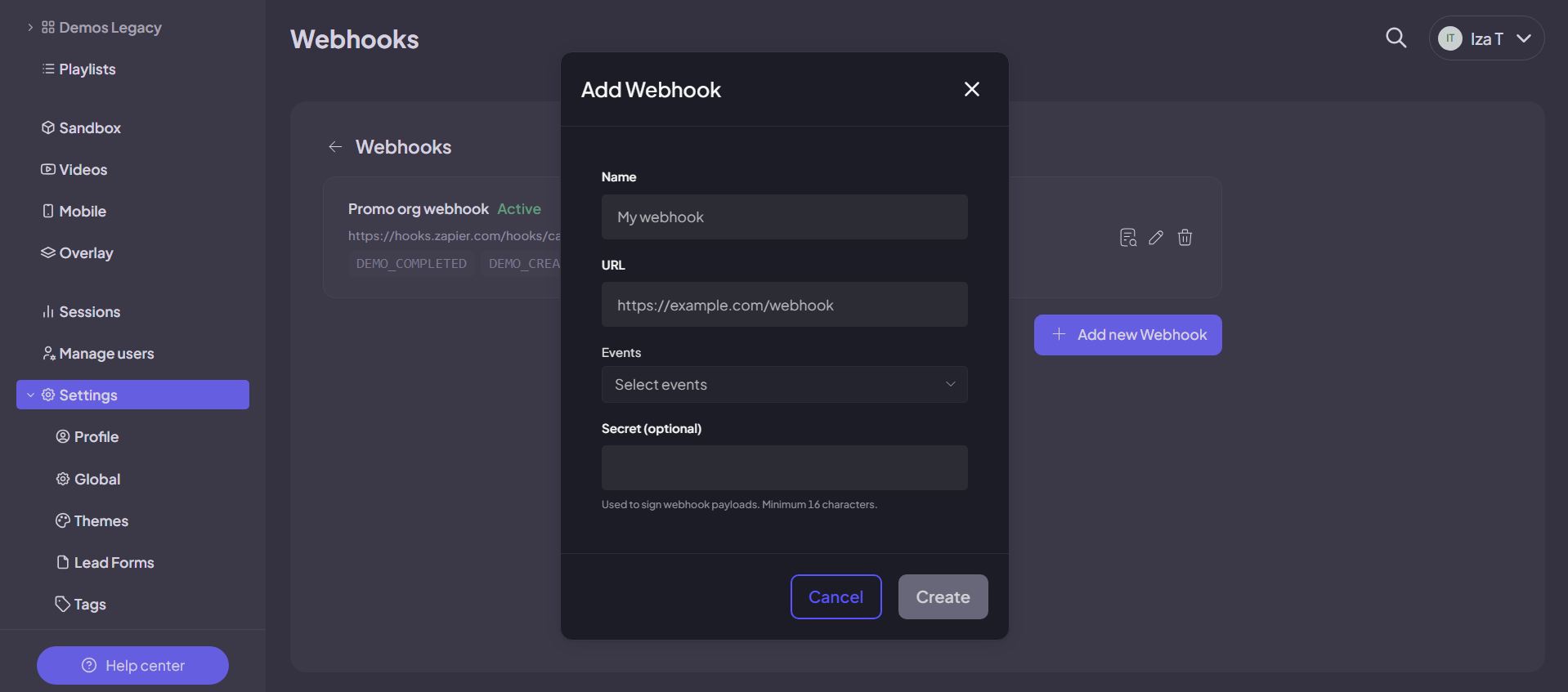
Adding a Global Webhook in Demoboost. Each trigger routes demo events into the tools where your revenue team works.
Build scoring rules on the events you can route. A completed demo plus a submitted lead form crossing your intent threshold should adjust the lead score in your CRM through the middleware workflow, without manual rep intervention.
Set real-time alerts for the three trigger events. The moment a target account completes a demo or submits a lead form, the assigned account executive should receive a CRM task or Slack notification. Lag between intent signal and rep response is where deals lose momentum.
Audit your middleware workflows regularly. As your rubric evolves and your team grows, the mappings between webhook events and CRM actions need to keep up. Treat this as a recurring operations task, not a one-time setup.
Enterprise deals are not won with a single contact. Buying committees involve multiple stakeholders across procurement, IT, finance, and end-user teams. Aggregate demo engagement tells you a deal is active. Identified, stakeholder-level engagement tells you who is driving it and where it stands.
Gate prospect-facing demos with a lead form. Demoboost's Share modal lets you attach a customizable lead form before the demo begins, so every session after that point is tied to a named person, not an anonymous view. This is the identification backbone of the whole strategy: without it, you have traffic, not stakeholders.
Watch for new names from the same company. When a second or third person completes the lead form on a shared demo, the buying committee is expanding. The company email domain on those submissions tells you they belong to the same organization even before anyone updates the CRM. Because lead form completed is a webhook trigger, each new identified stakeholder can automatically create a CRM task or rep alert the moment it happens.
Let buyers route themselves with Pick Your Own Journey. Demoboost's CYOJ screens and Playlists let a prospect choose the demo path matching their use case and role. The path they choose is itself a role and intent signal: the SE sees which journey each identified viewer took and what they explored before the conversation happens.
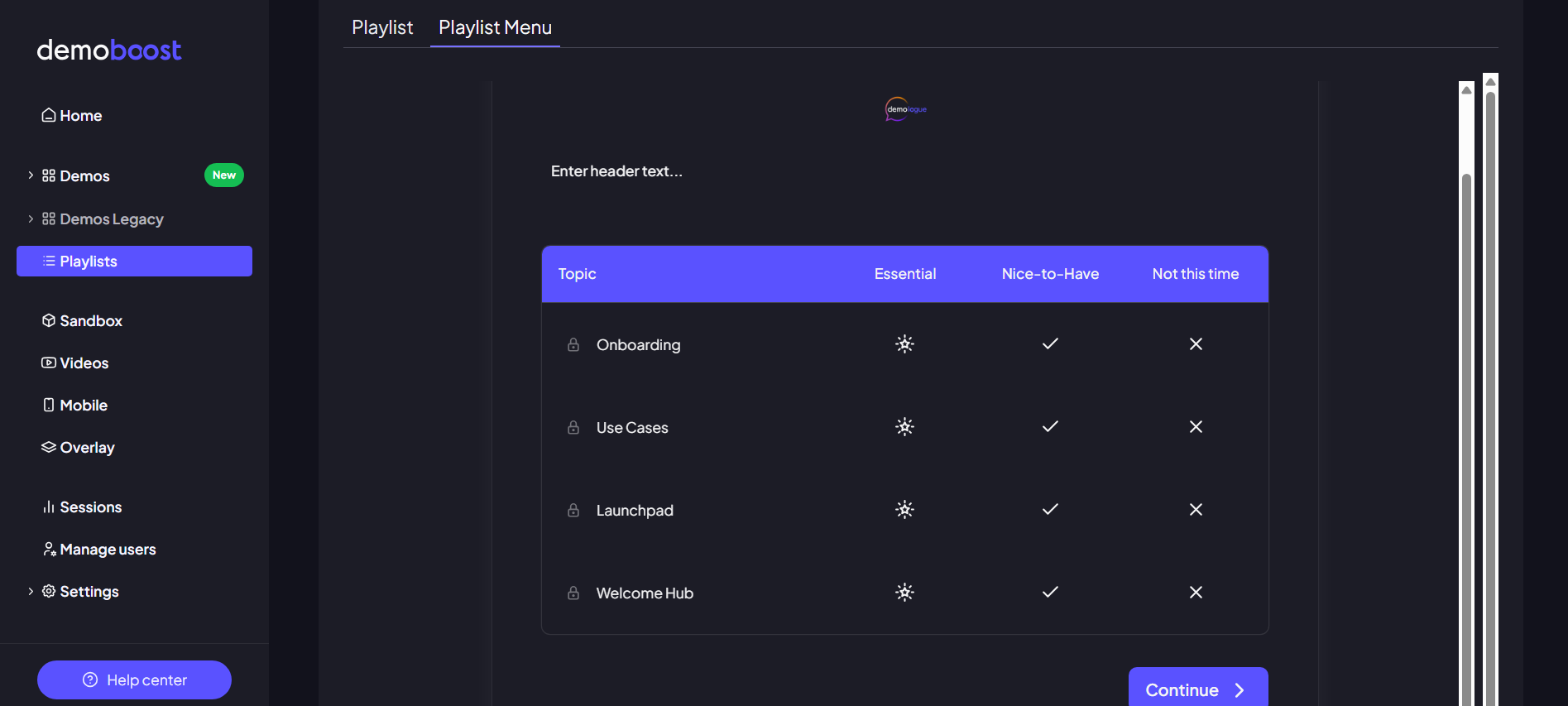
Demoboost's CYOJ qualification system routes buyers to the right demo path based on their use case before the discovery call.
Cross-reference identified viewers against your CRM contacts. Flag people your team has not formally engaged yet. A name your AE does not recognize is one of the clearest signals that internal momentum is building beyond your original contact, and it should trigger outreach to your champion, not just a note in the file.
Tag each identified stakeholder with a role label in your CRM: champion, economic buyer, technical evaluator, blocker. Tailor follow-up messaging to each role based on what they engaged with in the demo analytics.
Where buyers disengage in a demo is diagnostic data. A technical evaluator who exits during the integration walkthrough signals a different problem than an economic buyer who leaves at the ROI dashboard. Drop-off analysis tells you which parts of your demo story are not landing, and where to fix them.
Review section-level engagement in Demoboost's demo analytics. Identify the highest drop-off points and treat them as narrative gaps: the sections where your story loses relevance for that viewer.
Cross-reference drop-offs with the stakeholder roles you identified in Step 5. The same section can underperform for completely different reasons depending on who is watching. Deal-stage context comes from your CRM; the rep or RevOps connects the two views. This is a manual join today, which is exactly why identified viewers (Step 5) matter so much: without names, there is nothing to join on.
Reorder or reframe underperforming sections based on the data. Moving a high-value outcome screen earlier in a sequence can recover attention from economic buyers scanning for ROI before committing to depth.
One specific fix worth testing: if buyers consistently drop off during data-heavy dashboard sections, the problem is often that the numbers in the demo do not match the prospect's world. Showing a 1 billion euro revenue chart to a 50-person company signals you do not know your audience. Demoboost's AI Graph and Data Editor generates context-appropriate chart data from a prompt, changing the numbers in a demo dashboard in seconds without manual editing. For SEs demonstrating data-heavy products, this is one of the most direct ways to recover engagement at the sections that matter most.
Test the revised flow with a new cohort and let completion data determine which narrative performs better.
Document winning demo structures by persona and industry segment. Future reps inherit proven patterns rather than starting from scratch on every deal.
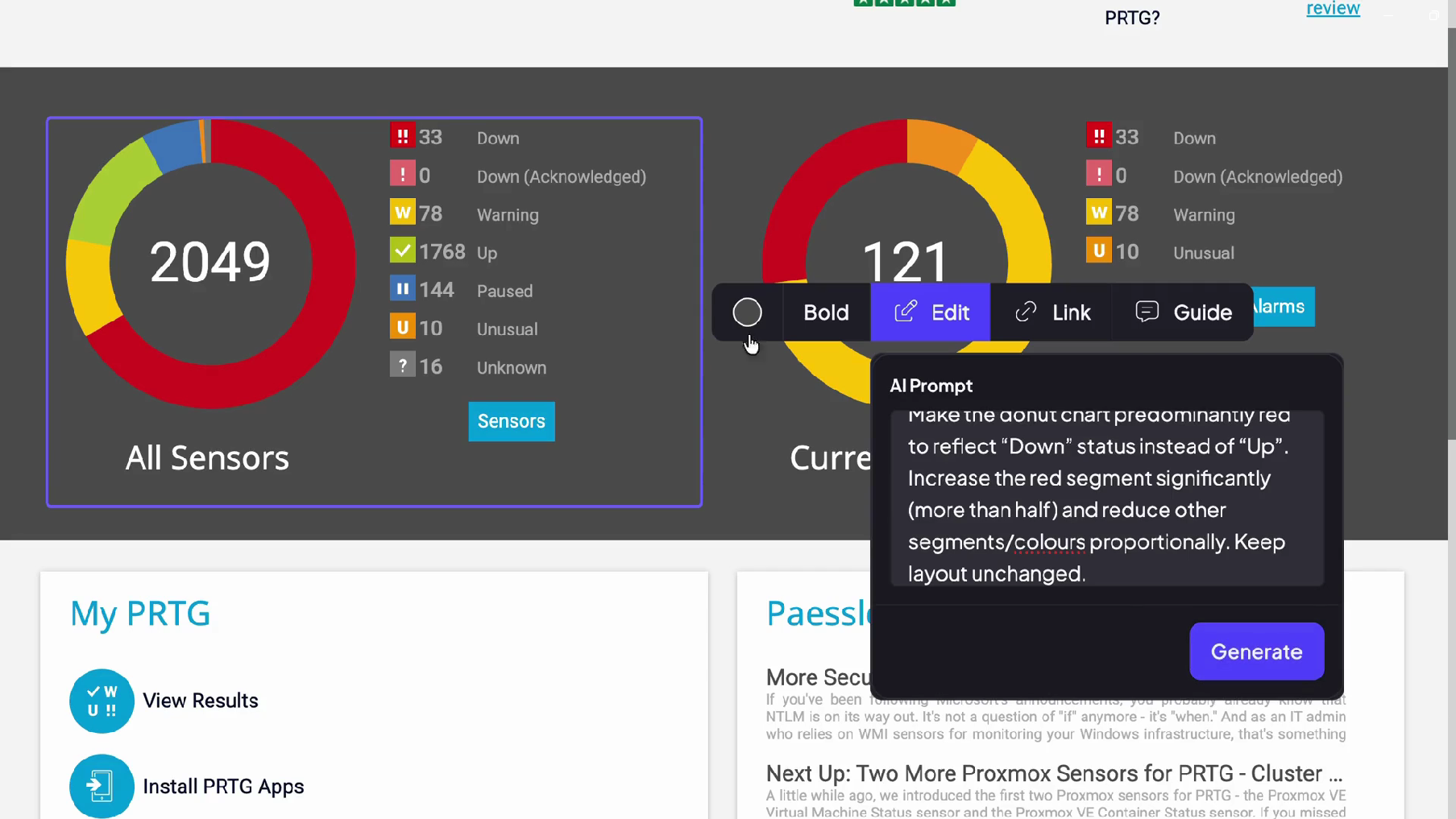
Demoboost's AI Graphs replaces static dashboard data with context-appropriate synthetic chart data from a natural language prompt.
The intent strategy closes with outreach: trigger-based messages timed to the moment a stakeholder's engagement peaks, not generic sequences that ignore what the demo platform already captured.
The tactical follow-up playbook, timing windows, signal-by-signal responses, and messaging patterns, is in the buyer intent signals guide. At the system level, build three things:
Trigger mapping. Each webhook event (demo completed, lead form completed) should fire a defined action in your CRM or sales engagement platform, routed to a named owner. Behaviors visible only in analytics, a replayed feature, an unusual time-on-section, become manual triggers: the rep checks analytics before every follow-up and acts on what they see. If a signal does not lead to an action, it is reporting, not strategy.
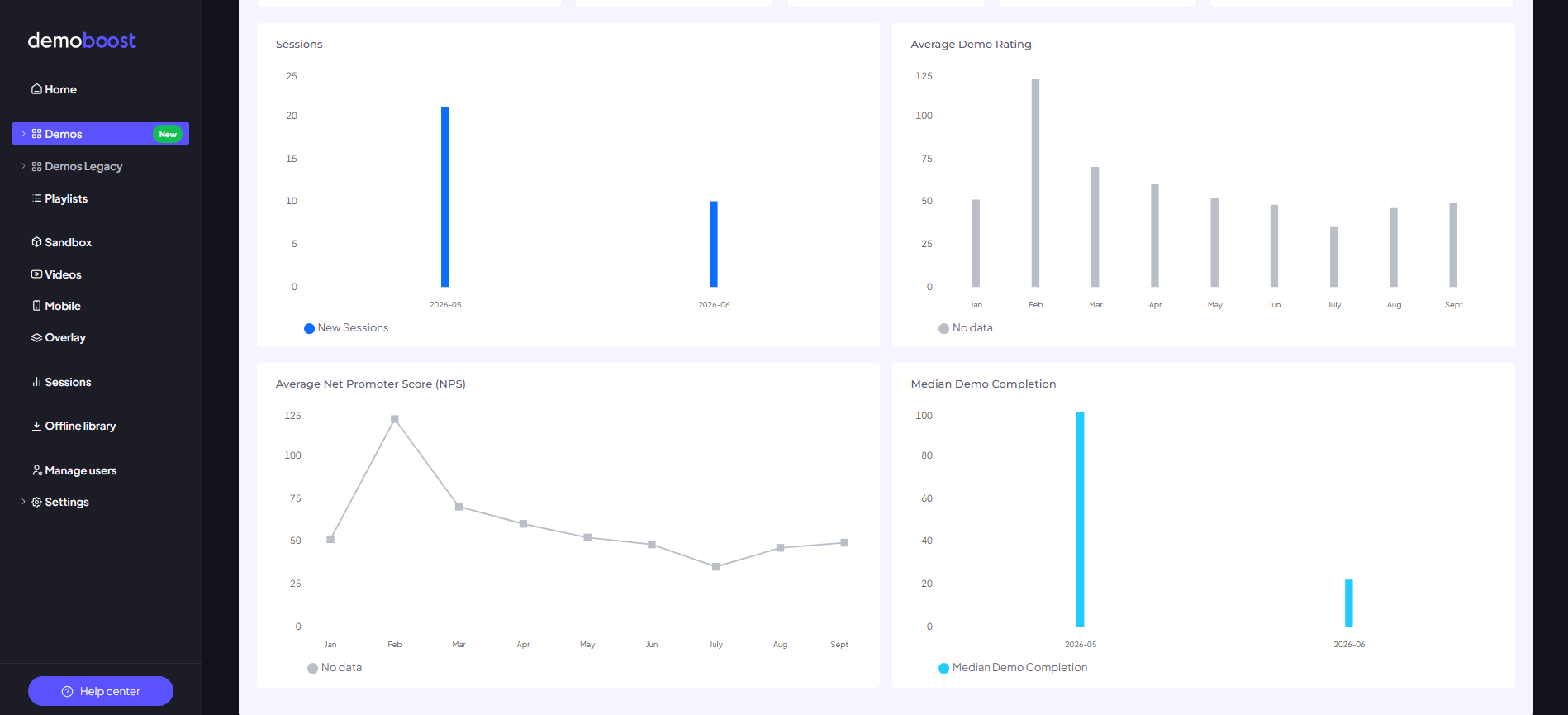
Contact-level demo engagement tracked in Demoboost's analytics dashboard, including sections viewed, time spent, and return visits.
Urgency thresholds for committee activation. When multiple stakeholders from one account identify themselves within a 48-hour window, notify the account executive immediately. This is a buying committee activation signal, not a routine lead event.
A quarterly recalibration loop. Track which intent signals produce the highest reply and meeting-booked rates. Deprioritize low-signal triggers that generate activity without pipeline movement, and recalibrate thresholds using closed-won data.
Not every demo tool is built for enterprise buying complexity. Three capabilities separate platforms built for structured presales motions from tools built for lighter workflows.
Step-level engagement data on identified viewers. Aggregate session counts are not intent data. Look for a platform that captures demos at a fidelity that produces section-level behavior, and ties that behavior to named viewers through lead forms. Knowing that an identified CFO revisited the ROI section twice is more useful than knowing the account had three demo sessions. This is exactly what Demoboost's demo analytics and Share modal lead forms are built for.
Event routing into your GTM stack. Signals that never reach your CRM cannot drive action. Evaluate how engagement events get into your systems: Demoboost's Global Webhooks push demo created, demo completed, and lead form completed events into CRM workflows via middleware, with full behavioral context available in demo analytics.
A demo library your team can actually govern. As demo counts grow, engagement data from outdated or off-message demos becomes noise rather than signal. Look for a platform that supports an organized, current library: with Demoboost, Demo Tags and a structured library keep assets findable and reviewable, so a growing SE team knows which demos are current and in play. [Demoboost data point to add if available: customer outcome on demo library organization or demo reuse at scale.]
Most enterprise sales teams have more intent data sitting in their demo platform than they realize. The problem is not a lack of signals. It is that those signals are not structured, not connected to the CRM, and not reaching the right rep at the right moment.
The framework in this guide closes that gap. It takes the behavioral data buyers generate across every demo interaction and turns it into a coordinated system: identified stakeholders, a shared weighting framework, webhook-routed events, and follow-up triggered by actual buying behavior rather than arbitrary cadence timing.
Demoboost gives enterprise revenue teams the infrastructure to run this end to end: demo creation with Demoboost AI, step-level demo analytics, lead identification through the Share modal, CYOJ and Playlists for buyer self-routing, the AI Graph and Data Editor for data-heavy demos, Global Webhooks, and Revenue Intelligence connecting demo engagement to your revenue workflows. You define the scoring rules and follow-up triggers. Demoboost provides the first-party data that powers them.
1. What is an enterprise intent strategy?
An enterprise intent strategy is a structured approach to identifying which accounts are in an active buying cycle, which stakeholders are driving the evaluation, and what behavioral signals indicate readiness for the next sales action. For B2B SaaS teams with complex sales motions, it typically combines first-party demo engagement data with CRM workflows and automated follow-up triggers.
2. How is demo engagement different from third-party intent data?
They serve different funnel stages. Third-party intent data (review site research, topic surge) is business development intelligence: it signals that an account may be in the market and helps you prospect. Demo engagement is deal intelligence: it shows what a specific buyer cared about once they saw your product, which personas engaged with which product areas, and whether the buying committee is activating. Prospecting intelligence can be bought. Deal intelligence has to come from your own interactions with the buyer.
3. How do you track intent signals across a multi-stakeholder buying committee?
Gate prospect-facing demos with a lead form so every viewer identifies themselves before the demo begins. Demoboost's Share modal attaches a customizable form to any shared demo, tying each session to a named person. When new names from the same company appear, the committee is expanding, and because lead form completed is a webhook trigger, each new stakeholder can automatically create a CRM task or rep alert.
4. How does Demoboost connect demo engagement to a CRM?
Demoboost's Global Webhooks push three events into your GTM stack: demo created, demo completed, and lead form completed. Via middleware such as Zapier, Make, or Workato, those events can create CRM tasks, update records, and trigger rep alerts. Deeper behavioral context, sections viewed, time spent, replays, return visits, is available in Demoboost's demo analytics alongside the webhook events.
5. What demo behaviors signal that an enterprise deal is accelerating?
The strongest signals are: multiple stakeholders from the same account identifying themselves on a shared demo, a new or unrecognized stakeholder completing the lead form (buying committee expansion), return visits to high-weight sections like security or integrations, and replays of a specific feature. Any of these should prompt an immediate account executive response.
6. How do you use demo drop-off data to improve your sales narrative?
Review section-level engagement in demo analytics and identify the sections with the highest exit rates. Cross-reference those drop-off points with the stakeholder roles you identified through lead forms, then reframe or reorder underperforming sections and test the revised narrative with a new cohort. For data-heavy demos, Demoboost's AI Graph and Data Editor lets SEs replace static dashboard numbers with context-appropriate data in seconds, which directly addresses one of the most common drop-off causes.
7. What is the right follow-up response to a high-intent demo signal?
Reference the specific product area the stakeholder engaged with. A message tied to observed behavior consistently outperforms generic follow-up. For committee activation (multiple stakeholders identifying themselves within 48 hours), notify the account executive immediately rather than waiting for a scheduled cadence.
8. How is this different from the standard demo analytics most platforms offer?
Standard demo analytics shows aggregate session data: total views, average watch time, overall completion rate. An enterprise intent strategy requires identified, stakeholder-level engagement: which named viewer explored which section, how many times, whether they returned, and whether they involved their buying committee. Demoboost ties engagement to identified viewers through lead forms and routes key events into CRM workflows via webhooks, so the data drives action instead of sitting in a report.
Book a live demo to see how Demoboost helps your team cut demo prep time, qualify buyers faster, and focus on real opportunities.
Book a Live Demo

.png)
.png)
