1. Track Onboarding Demo Completion
Use case description
Use demo completion to track whether customers complete key onboarding journeys.
For example:
a new admin completes the onboarding demo
a customer finishes a required product walkthrough
a new user completes role-based training
an onboarding playlist is completed before the first success check-in
This helps CS teams understand whether customers are progressing through enablement content.
Why it matters
Onboarding progress is often hard to see
Demo completion shows learning intent
CSMs can follow up based on actual customer engagement
Onboarding often depends on shared resources, live sessions and follow-up emails.
But if the CSM does not know whether the customer completed the onboarding demo, it is harder to understand who is ready, who is stuck and who needs help.
Demo completion gives CS teams a clear signal that the customer has engaged with the product education journey.
Best-fit teams
Customer Success, Onboarding, Implementation, RevOps, CS Enablement.
Demo data used
Demo completed, demo name, demo tag, viewer email, completion timestamp, account, onboarding stage, customer segment, owner.
Intent signals identified
Onboarding progress, learning intent, activation readiness, product education, customer engagement.
Operational triggers
When a customer completes an onboarding demo, update progress and notify the right owner.
Example triggers:
onboarding demo completed = update onboarding progress
demo tag = admin training = mark admin training complete
viewer email matches customer account = update account activity
onboarding demo completed before kickoff = notify CSM
required demo completed = unlock next onboarding step
Example tools that can be connected
Salesforce, HubSpot CRM, Gainsight, Planhat, Totango, ChurnZero, Slack, Microsoft Teams, Zapier, Make, Workato.
KPIs measured
.png)
Data flow
Customer completes onboarding demo
Demoboost captures demo completion
Onboarding progress is updated
Global Webhook routes event
CSM receives notification or task
CRM or CS platform matches customer account
Customer moves to the next onboarding step
.png)
How to activate
Start with the core onboarding demo.
Onboarding demo completed
Role-based demo completed
Demo completed by key contact
Required demo not completed
Mark onboarding step complete
Update user training status
Review in onboarding check-in
Begin with one onboarding milestone before expanding into full training tracking.
Recommended first step
Update the customer account when the main onboarding demo is completed.
2. Route Customer Training Requests From Gated Demos
Use case description
Use lead forms at the start of customer education demos to capture training intent and route the request to the right CS owner.
For example:
a new admin opens a gated onboarding demo and selects their role
a customer chooses which feature area they want to learn about before starting a training demo
a user submits a form requesting access to a specific enablement path
a customer indicates they need onboarding, advanced training or implementation guidance before entering the demo
This helps CS teams understand who is engaging with customer education content and what kind of training they are looking for.
Why it matters
Customer education often starts before a live CSM conversation
Lead forms can capture role, account and training intent
CS teams can route follow-up based on what the customer requested
A lead form at the beginning of a demo should not be treated as an in-demo support request.
It is better used as an entry point into a customer education journey. It can capture who the viewer is, which account they belong to, what role they have and what they want to learn.
That gives CS teams useful context before the customer completes the demo.
Best-fit teams
Customer Success, Onboarding, Implementation, CS Ops, RevOps.
Demo data used
Lead form submitted, submitted form fields, demo name, demo tag, viewer email, account, role, training need, product area, onboarding path, submission timestamp.
Intent signals identified
Training intent, onboarding need, role-based education need, feature interest, customer learning path.
Operational triggers
When a customer submits a lead form before starting a training demo, route the request or update the customer account.
Example triggers:
lead form submitted = create or update customer contact
demo tag = onboarding = route to onboarding owner
role field = admin = assign admin onboarding path
product area field = integrations = notify implementation owner
training need field = advanced feature = create CSM follow-up task
customer account matched = log training request on account
Example tools that can be connected
Salesforce, HubSpot CRM, Gainsight, Planhat, ChurnZero, Totango, Slack, Microsoft Teams, Zapier, Make, Workato.
KPIs measured
.png)
Data flow
Customer submits lead form before training demo
Demoboost captures form data, demo tag and demo context
Training path or owner is assigned
Global Webhook routes event
CSM receives context or task
CRM or CS platform matches customer account
Customer continues into the relevant training journey
.png)
How to activate
Start with one gated customer education demo.
Route to onboarding owner
Assign role-based onboarding path
Route to relevant CSM or implementation owner
Update onboarding or adoption workflow
Use the form to capture training intent before the demo starts, not as an in-demo support request.
Recommended first step
Add a short lead form to one onboarding or training demo and route submissions to the assigned CSM or onboarding owner.
3. Identify Customers Who Abandon Required Training
Use case description
Use demo abandoned events to identify customers who started a required training journey but did not complete it within the predefined timeframe.
For example:
a customer submits the form to access an onboarding demo but does not complete the demo
a new admin starts a required training path but no completion event is recorded
a customer enters a gated feature training demo but does not finish it within the expected timeframe
a key stakeholder opens a required onboarding demo but does not complete it before the follow-up window
This helps CS teams spot possible onboarding or training gaps before they turn into adoption risk.
Feasibility note
This use case depends on the demo abandoned event.
The abandoned event should be described as a delayed signal. It can be based on a starting signal, such as lead form submitted or demo opened, followed by no demo completed event within a predefined timeframe.
The threshold should be described as fixed or predefined, for example 7 days, unless configurable thresholds are later supported.
Why it matters
Incomplete training can delay adoption
Abandoned onboarding demos can indicate risk
CSMs need a way to spot training gaps before they become bigger issues
Customers do not always tell CS teams when they are stuck.
If a customer starts a required training journey but does not complete it, that may indicate lack of time, lack of clarity or missing internal ownership.
A demo abandoned event gives CS teams a clearer signal to review the account and decide whether proactive follow-up is needed.
Best-fit teams
Customer Success, Onboarding, Implementation, CS Ops, RevOps.
Demo data used
Demo abandoned, lead form submitted, demo completed, demo name, demo tag, viewer email, account, submission timestamp, abandonment timestamp, onboarding stage.
Advanced versions may use demo opened, drop-off point, time spent, repeat visits or playlist progress where available through analytics or future webhook support.
Intent signals identified
Incomplete training, onboarding risk, delayed activation, low enablement engagement, possible customer friction.
Operational triggers
When a customer starts a required training journey but does not complete it within the predefined timeframe, create a review or follow-up workflow.
Example triggers:
demo abandoned + demo tag = onboarding = create CSM review task
demo abandoned + demo tag = admin training = flag admin onboarding risk
demo abandoned + demo tag = feature training = create adoption follow-up task
lead form submitted + no demo completed after predefined timeframe = mark training incomplete
demo completed = mark training complete and close the follow-up loop
Example tools that can be connected
Salesforce, HubSpot CRM, Gainsight, Planhat, ChurnZero, Totango, Asana, Monday.com, Slack, Microsoft Teams, Zapier, Make, Workato, BI tools.
KPIs measured
.png)
Data flow
Customer submits form or opens required training demo
Demoboost captures the start signal
Webhook routes abandoned event with demo tag and customer context
No demo completion is recorded within the predefined timeframe
CRM or CS platform matches the customer account
Demoboost triggers demo abandoned event
CSM task or reporting flag is created
Customer receives proactive follow-up
.png)
How to activate
Define the required training demos and the abandonment window first.
Lead form submitted before onboarding demo
Demo opened for required training
Admin training path started
Feature training requested
No demo completion within predefined timeframe
No demo completion within predefined timeframe
Admin demo not completed before onboarding check-in
Feature demo not completed before adoption review
This use case should be positioned as a delayed workflow, not an instant webhook action.
Recommended first step
Create an abandonment workflow for one gated onboarding demo: customers who submit the lead form or open the demo but do not trigger a demo completion event within the predefined timeframe.
4. Drive Feature Adoption With Targeted Demo Follow-Up
Use case description
Use demo completion and demo tags to drive adoption of specific features or workflows.
For example:
a customer completes a basic onboarding demo and receives an advanced feature demo
a user completes a feature walkthrough and the CSM follows up with best practices
an account manager sends a targeted demo for an underused module
a customer submits a form asking about a specific feature
This helps CS teams connect product education to adoption motions.
Why it matters
Feature adoption often needs guided education
Demo tags reveal which topics customers
engage with
CSMs can send the next-best enablement asset
Product usage alone may show that a feature is underused. Demo engagement can show whether the customer is learning about that feature and showing interest in using it.
That gives CS teams a better way to drive adoption with relevant education.
Best-fit teams
Customer Success, Account Management, Product Enablement, CS Ops, Product Marketing.
Demo data used
Demo completed, lead form completed, demo name, demo tag, product category, feature area, viewer email, account, submitted form fields.
Intent signals identified
Feature interest, adoption readiness, learning intent, product maturity, enablement need.
Operational triggers
When a customer completes a tagged demo or submits a feature-related form, trigger the next adoption step.
Example triggers:
demo tag = feature A = send feature A best practices
onboarding demo completed = recommend advanced demo
lead form completed = create CSM follow-up task
customer segment = enterprise = route to account manager
feature demo completed = update adoption campaign status
Example tools that can be connected
Salesforce, HubSpot CRM, Gainsight, Planhat, ChurnZero, Intercom, Customer.io, Slack, Microsoft Teams, Zapier.
KPIs measured
.png)
Data flow
Customer completes tagged feature demo
Demoboost captures demo completion and tag
CSM or automation sends next-best content
Global Webhook routes event
Customer adopts or explores feature
CRM or CS platform updates feature interest
Adoption impact is measured
.png)
How to activate
Create a feature demo to adoption motion map.
Send getting-started guide
Notify CSM for adoption play
Send technical setup content
Send admin best practices
Offer reporting review session
Start with features that matter most for retention or expansion.
Recommended first step
Tag your top adoption demos by feature area and map each one to a follow-up action.
5. Surface Expansion Interest From Existing Customers
Use case description
Use demo engagement to identify existing customers who show interest in advanced features, add-ons or new use cases.
For example:
a customer completes an advanced product demo
an account watches a demo for a module they do not currently use
a customer submits a form asking about an add-on
multiple users engage with expansion-related demo content
This helps CS and account management teams spot expansion opportunities earlier.
Why it matters
Expansion interest often appears before a formal sales conversation
Demo engagement can reveal new use-case demand
Account teams can follow up with relevant commercial context
Customers may explore new capabilities before they are ready to ask for pricing or speak to sales.
Demo engagement gives the account team an early signal that the customer is considering more value from the product.
Best-fit teams
Customer Success, Account Management, Account Executives, RevOps, Product Marketing.
Demo data used
Demo completed, lead form completed, demo name, demo tag, viewer email, account, product category, add-on interest, submitted form fields, completion timestamp.
Advanced versions may use repeat visits, multiple stakeholders, demo shares or digital sales room activity where available through analytics or exports.
Intent signals identified
Expansion interest, cross-sell interest, upsell readiness, multi-product interest, buying committee activity.
Operational triggers
When an existing customer engages with expansion-related demo content, notify the account team or update expansion fields.
Example triggers:
demo tag = expansion = notify CSM and account manager
add-on demo completed = update expansion interest field
lead form completed = create expansion follow-up task
multiple contacts engage = create account review task
demo tag = advanced feature = add to expansion campaign
Example tools that can be connected
Salesforce, HubSpot CRM, Gainsight, Planhat, ChurnZero, Slack, Microsoft Teams, Outreach, Salesloft, Zapier.
KPIs measured
.png)
Data flow
Existing customer completes expansion demo or submits form
Demoboost captures expansion signal
Expansion interest field or task is created
Global Webhook routes event
CSM or account manager follows up
CRM or CS platform matches customer account
Expansion opportunity is created or progressed
.png)
How to activate
Define which demos indicate expansion interest.
Advanced feature demo completed
New use-case demo completed
Lead form asks about pricing
Update expansion interest
Start with expansion demos that map clearly to a commercial motion.
Recommended first step
Tag expansion-related demos and notify the account owner when they are completed by an existing customer.
6. Monitor Product Education Engagement by Account
Use case description
Roll demo engagement into account-level customer education visibility.
For example:
track which accounts completed onboarding demos
see which customers engaged with feature training
identify accounts with no enablement activity
compare customer segments by demo completion and training engagement
This helps CS teams understand customer education at the account level, not only the contact level.
Why it matters
Customer education is often scattered across tools
Account-level engagement helps CSMs prioritise outreach
Training visibility supports adoption and renewal conversations
A single user completing a demo may be useful. Multiple users from the same customer account completing training content may be a stronger adoption signal.
Account-level demo engagement gives CS teams a clearer picture of product education health.
Best-fit teams
Customer Success, CS Ops, Enablement, Onboarding, Revenue Leadership.
Demo data used
Demo completed, lead form completed, demo name, demo tag, viewer email, company domain, account ID, completion timestamp, customer segment.
Advanced versions may use repeat visits, number of engaged users, playlist completion or section-level engagement where available through analytics or exports.
Intent signals identified
Education engagement, customer health, adoption readiness, stakeholder activity, enablement coverage.
Operational triggers
When customer demo engagement happens, update account-level education fields or reporting.
Example triggers:
demo completed = update last training engagement date
onboarding demo completed = mark onboarding education complete
feature demo completed = update feature education field
account has multiple trained users = update enablement coverage
account has no demo engagement = flag for CSM review
Example tools that can be connected
Salesforce, HubSpot CRM, Gainsight, Planhat, Totango, ChurnZero, Looker, Tableau, Power BI, Zapier.
KPIs measured
.png)
Data flow
Customer users engage with demos
Demoboost captures completion or form events
Webhook or analytics export routes data
CRM or CS platform matches users to account
Account-level education fields are updated
CS dashboard shows customer education health
CSM prioritises next actions
.png)
How to activate
Start with a small set of account-level education fields.
Last training engagement date
Onboarding demo completed
Feature training completed
Track onboarding progress
Track enablement coverage
Then use these fields in customer health reviews and QBR preparation.
Recommended first step
Create an account-level field for “Last training demo completed.”
7. Trigger Renewal or QBR Preparation Based on Demo Engagement
Use case description
Use demo engagement to prepare better renewal conversations, QBRs or success reviews.
For example:
a customer completes a feature adoption demo before a QBR
an account engages with expansion demos before renewal
multiple users complete training before a business review
a customer submits feedback through a demo form
This gives CSMs and account managers more context before strategic customer conversations.
Why it matters
QBRs often rely on usage data and CSM notes only
Demo engagement shows what customers are learning or exploring
Renewal conversations become more specific and proactive
Customer conversations are stronger when the CSM knows what the customer has recently engaged with.
Demo engagement can reveal active interests, education gaps or expansion signals that should shape the agenda.
Best-fit teams
Customer Success, Account Management, RevOps, CS Leadership.
Demo data used
Demo completed, lead form completed, demo name, demo tag, viewer email, account, completion timestamp, submitted form fields, customer stage.
Advanced versions may include repeat visits, multiple users, demo shares or playlist activity where available through analytics or exports.
Intent signals identified
Renewal readiness, adoption interest, expansion interest, education gap, stakeholder engagement, customer health signal.
Operational triggers
Before a renewal, QBR or success review, surface recent demo engagement for the account team.
Example triggers:
demo completed before QBR = add to account review notes
expansion demo completed = add expansion topic to agenda
lead form completed = include customer question in review
multiple users completed training = mark enablement progress
no recent demo engagement = flag education gap
Example tools that can be connected
Salesforce, HubSpot CRM, Gainsight, Planhat, ChurnZero, Google Docs, Notion, Slack, Microsoft Teams, Zapier.
KPIs measured
.png)
Data flow
Customer engages with demo before renewal or QBR
Demoboost captures demo event
Webhook or export routes data
CRM or CS platform updates account activity
CSM receives preparation task or account summary
QBR or renewal agenda is personalised
Renewal or expansion outcome is tracked
.png)
How to activate
Define which demo signals should appear in renewal preparation.
Discuss adoption progress
Start with surfacing signals to the CSM rather than fully automating the agenda.
Recommended first step
Add recent demo engagement to the CSM’s QBR preparation checklist.
8. Govern Customer-Facing Enablement Demo Creation
Use case description
Use demo created events and demo tags to manage customer-facing enablement assets.
For example:
a new onboarding demo is created and needs review
a support team creates a troubleshooting demo that should be added to the library
a CSM builds a customer-specific training demo
a new feature training demo needs tags before being reused
This helps CS enablement keep customer education content organised and accurate.
Why it matters
Customer-facing demos need to stay accurate
Enablement libraries get messy without ownership
Tags improve discoverability, reporting and reuse
CS teams often create demos for onboarding, training, support and adoption.
Without a lightweight governance process, those assets can become hard to find, outdated or inconsistent across customer teams.
Best-fit teams
Customer Success, CS Enablement, Support, Onboarding, Product Education, RevOps.
Demo data used
Demo created, demo name, creator, creation timestamp, folder, demo tag, owner, product area, lifecycle stage, review status.
Intent signals identified
New enablement asset, governance need, training library growth, reuse opportunity, content quality risk.
Operational triggers
When a new customer-facing demo is created, trigger a review or tagging workflow.
Example triggers:
demo created = notify CS enablement owner
demo created = create review task
demo created in customer-facing folder = review for reuse
new onboarding or training demo created = request required tags
reusable demo created = add to enablement library review
The goal is to make new customer-facing demos visible, then have the owner review, tag and organise them.
Example tools that can be connected
Slack, Microsoft Teams, Asana, Monday.com, Notion, Jira, Airtable, Salesforce, HubSpot, Zapier.
KPIs measured
.png)
Data flow
CSM, support or onboarding team creates new demo
Demoboost captures demo created event
Global Webhook routes event
Task or notification is created
CS enablement reviews and tags the demo
Demo library is organised
Teams reuse accurate customer-facing assets
.png)
How to activate
Create a tagging model for customer-facing demos.
Then create a review workflow for any new customer-facing demo that should be reused.
Recommended first step
Notify the CS enablement owner whenever a new onboarding or training demo is created.
.png)






.png)
.png)

.png)


.png)
.png)
.png)

.png)

.png)

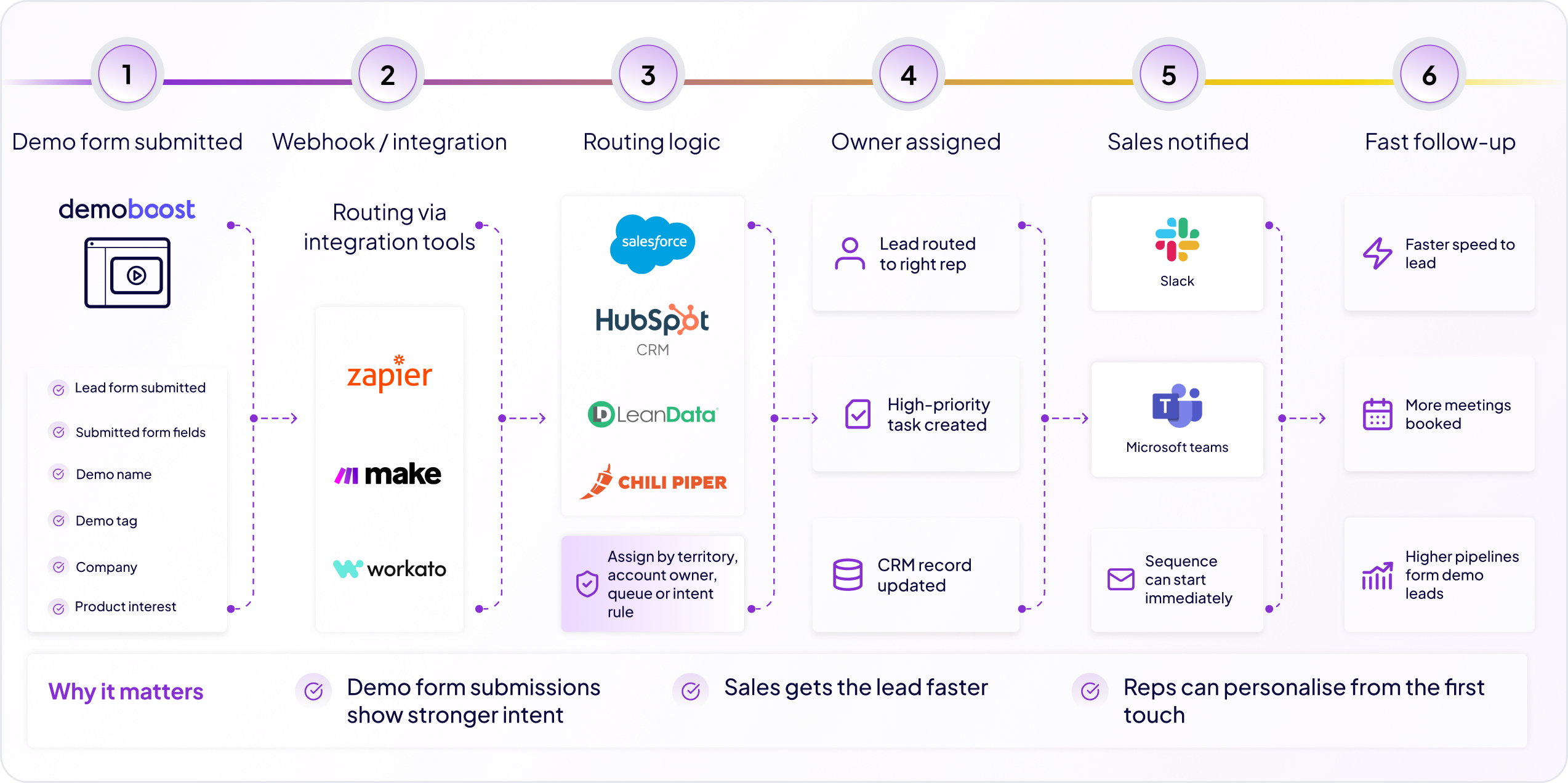

.png)
.png)
.png)
.png)
.png)
.png)
.png)
.png)
.png)
.png)
.png)
.png)
.png)
.png)
.png)
.png)
.png)
.png)
.png)
.png)
.png)
.png)
.png)
.png)
.png)
.png)
.png)
.png)
.png)
.png)
.png)
.png)
.png)
.png)
.png)
.png)
.png)
.png)
.png)
.png)
.png)
.png)
.png)
.png)
.png)