.png)

%20(1).png)


.png)
Learn how presales is evolving and howyour team can stay ahead in atech-driven sales landscape.

.png)
How top GTM teams use interactive demos across the full buyer journey — from awareness through adoption.
No thanks, I'll figure it out on my own.Most revenue teams already know demos are important. What they miss is that every demo interaction generates first-party intent data that is more reliable than almost any other signal in the funnel. When a buyer watches a demo, they are telling you what they care about, how serious they are, and whether the deal is moving.
This guide walks through how to read those signals systematically, build a prioritization framework, and connect demo engagement to your CRM and revenue workflows so that high-intent leads reach the right rep at the right moment.
Buyer intent signals from a demo are the behavioral data points that indicate how seriously a prospect is evaluating your product. They include which sections a buyer viewed, how long they spent, whether they returned, what they clicked, and whether they shared the demo with colleagues.
Unlike form fills or email opens, demo engagement captures product-level intent. A buyer who completes a 5-minute use-case demo, clicks a CTA, and shares the link internally is showing a fundamentally different level of buying readiness than someone who downloaded a PDF.
With Demoboost, these signals are captured at the step level across every shared demo. You can see which stakeholders viewed which sections, how many times, and push that data directly into your CRM, marketing automation platform, or revenue intelligence workflows.
Most B2B SaaS funnels run on third-party intent data, page visits, and form fills. These signals tell you someone engaged with your brand. Demo engagement tells you what they actually cared about once they saw your product.
The signal quality difference matters at scale. Typical B2B SaaS funnels show that only 13 to 26% of MQLs become SQLs, and only 15 to 30% of opportunities close. In many funnels, fewer than 5% of MQLs ever become customers. Most revenue teams are building entire motions around leads where the overwhelming majority will not convert.
Demo engagement data changes the quality of the signal. A buyer who watches a specific use-case demo, revisits the pricing section, and shares the demo with a VP of Finance is demonstrating product-level intent that a website visit or content download cannot match.
The demo is also one of the few places where buyers self-select into depth. They choose which sections to explore, how long to spend, and whether to involve their colleagues. That self-selection is extremely valuable data.
Before you can prioritize leads, you need to know what a genuinely engaged demo viewer looks like for your product. Without a baseline, raw numbers are meaningless. A 12-minute session is only significant if you know your average session runs 4 minutes.
Here is how to build that foundation:
With Demoboost, demo engagement data is captured at the step level across every demo format. You can see time-on-section, completion rates, CTA clicks, repeat visits, and shares, and push that data via global webhooks into your CRM or scoring system automatically once your criteria are defined.
Not all demo behaviors carry the same weight. Here is how to rank what you are seeing:
High-intent signals:
Medium-intent signals:
Low-intent or negative signals:
Demoboost captures these signals at the interaction level: demo views, completion rate, time spent, CTA clicks, repeat visits, form submissions, demo shares, and section-level engagement. These data points feed directly into the intent scoring framework described in the next section.
Once you have a baseline and a clear view of which behaviors signal intent, the next step is translating that data into a structured prioritization model.
Step 1: Assign numeric weights to each signal.
Start simple. Do not try to score every click. Focus on the behaviors that most clearly indicate buying readiness:
Step 2: Define three lead tiers.
Step 3: Layer in stakeholder composition.
A lead scoring Warm with a VP of Finance in the demo session deserves a manual upgrade to Hot. Stakeholder breadth is one of the clearest deal-seriousness indicators. When procurement, legal, or IT joins a demo uninvited, internal momentum is already building.
Step 4: Add a human review layer for high-value accounts.
Automated scores benefit from a quick review for strategic accounts. Buyers who explore specific product areas in depth often show readiness that raw completion percentages will not fully capture.
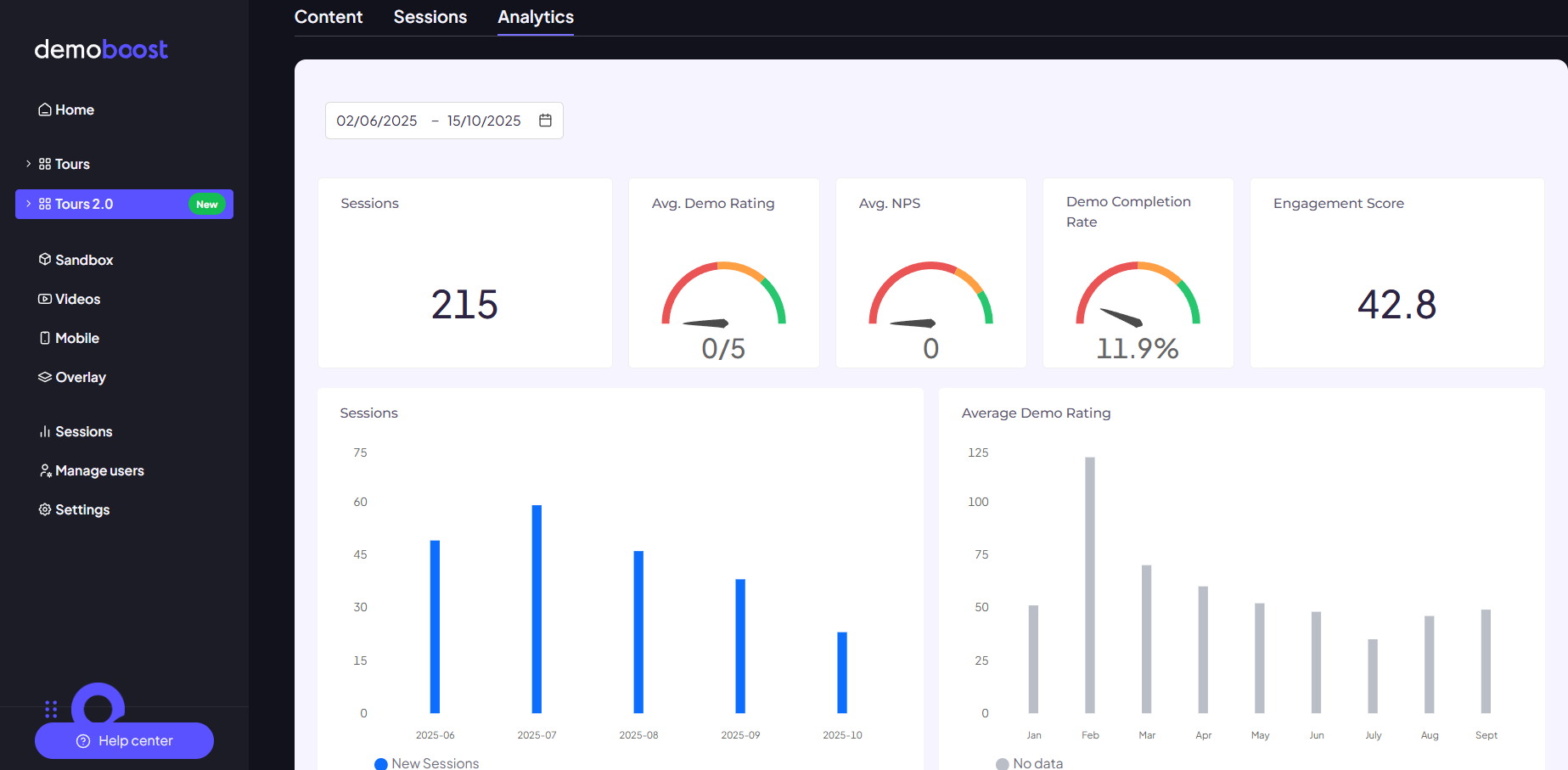
Demoboost's Lead Analytics tracks engagement across all of these dimensions and connects to your CRM via native integrations and global webhooks. Demo behavior becomes part of your lead scoring model rather than sitting in a separate analytics dashboard.
This is a live interactive demo — not a video. Click through to see how engagement data surfaces in real time, the way your buyers would experience it.
Liked what you saw?
Book a 30-min callThis is where demo analytics becomes revenue intelligence rather than just reporting.
Demoboost's global webhooks push demo engagement data to the tools your revenue team already uses. Every demo view, completion, CTA click, share, and section interaction can trigger the next best action across marketing, sales, RevOps, and customer success.
For marketing teams: Build remarketing audiences based on the specific demo a buyer watched. A prospect who completed a use-case demo should see a proof point or case study that continues their story, not a generic brand ad. Use demo completion and CTA clicks to trigger nurture sequences matched to the product area they explored. Use demo engagement as a lead scoring input, not just form fills.
For sales teams: Alert reps in real time when a target account engages with a demo. Send a Slack or email notification the moment a prospect revisits a pricing walkthrough or shares the demo internally. Before a discovery call, reps can see exactly which product areas the buyer explored. That makes the conversation more relevant from the first minute.
For RevOps: Push demo activity into CRM contact and deal records automatically. Create custom fields: last demo viewed, completion percentage, number of demo sessions, most engaged section, demo engagement score. Connect demo engagement to lifecycle stage triggers, lead routing rules, and pipeline reporting.
For presales leaders: Track which demo flows correlate with the highest win rates. Measure whether reps follow the recommended demo path or skip critical sections. Use demo data to justify presales involvement only when technical depth of engagement warrants it.
Example use cases enabled by Demoboost's global webhooks:
The data flow: Demoboost captures the engagement event, routes it via global webhook or middleware (Zapier, Make, Workato), and activates workflows in your CRM, marketing automation platform, sales engagement tool, or BI system.
.png)
Most marketing teams measure campaign performance by leads generated or cost per click. Demo engagement shifts the question to: which campaigns generate buyers who are actually evaluating your product?
The same demo link can show very different engagement quality across campaigns. Campaign A may drive high click volume but low completion rates. Campaign B may drive fewer clicks but higher completion rates, more CTA clicks, and more meetings. Campaign C may attract buyers who share the demo internally with their buying committee.
To measure this, tag all demo links with consistent UTMs capturing source, medium, campaign, content, and demo category. Create a reporting view that compares campaigns by demo engagement quality: completion rate, CTA click rate, demo-to-meeting conversion, and influenced pipeline.
The system only works if it runs consistently. Here is a practical workflow that applies to every demo cycle:
One step that most teams skip: reviewing which demo engagement patterns actually correlated with closed deals. Your scoring model should be updated at least every 90 days as you accumulate this data.
The framework described above becomes a scalable, repeatable system when the tech stack is connected properly.
Connect your demo platform to your CRM so demo interaction events map directly to contact and deal records. Configure trigger-based alerts for high-intent actions. Sync lead score tiers to your sequencing tool so cadence enrollment reflects current intent status, not last week's snapshot. Schedule a weekly audit to review which triggers fired, which leads moved tiers, and where automation gaps exist.
With Demoboost, the data capture layer is already built. Global webhooks push structured demo engagement data to Salesforce, HubSpot, Marketo, Pardot, Outreach, Salesloft, Segment, and other platforms in your stack. You define the scoring rules and automation logic; Demoboost provides the first-party demo engagement data that powers it.
The result: demo analytics stops being a reporting function and becomes a genuine revenue signal that routes the right leads to the right people at the right time.
Most teams get to the end of a demo cycle with a lot of activity data and not much clarity. Who is actually ready to buy? Which deals deserve presales time? Where should reps focus this week?
Demo engagement answers those questions, but only if the data is structured, connected, and acted on. A completion rate sitting in a dashboard does not prioritize a lead. A share event that never reaches the account executive does not accelerate a deal.
The framework in this guide works because it closes that gap. It takes the behavioral signals buyers generate during demo interactions and turns them into a repeatable prioritization system that feeds your CRM, your scoring model, and your follow-up workflows.
Demoboost gives revenue teams the infrastructure to run this end to end. Step-level analytics, global webhooks, CRM integrations, and lead routing that connects demo engagement to the tools your team already uses. You define the scoring rules. Demoboost provides the first-party data that powers them.
If your team is still prioritizing leads based on form fills and gut feel while demo engagement data sits unused, that is a fixable problem.
1.What are buyer intent signals from a product demo?
Buyer intent signals from a product demo are behavioral data points that indicate how seriously a prospect is evaluating your product. They include demo completion rate, time spent on specific sections, CTA clicks, return visits, and whether the prospect shared the demo with colleagues. These signals capture product-level intent that form fills and email opens cannot.
2.How is demo engagement different from other intent data?
Demo engagement is first-party intent data generated by real product interaction. Unlike third-party intent scores or page visits, demo engagement shows you what a buyer cared about once they saw your product: which features they explored, how long they spent, and whether they involved their buying committee. That makes it a much more reliable signal of buying readiness.
3.What demo behaviors are the strongest indicators of purchase intent?
The strongest indicators are: completing the demo, clicking a CTA, sharing the demo internally, returning to the demo more than once, and spending significant time on pricing, integration, or security sections. Multiple stakeholders from the same company engaging with a shared demo is also a high-confidence buying signal.
4.How does Demoboost capture and use demo engagement data?
Demoboost tracks engagement at the step level across every shared demo, capturing demo views, completion rates, time spent, CTA clicks, repeat visits, form submissions, section-level engagement, and demo shares. This data is available in Demoboost's analytics dashboard and can be pushed to your CRM, marketing automation platform, or revenue stack via global webhooks.
5.How do you build a lead scoring model from demo engagement?
Start by identifying the four to five behaviors that most clearly indicate buying readiness for your product (typically: demo completed, CTA clicked, demo shared, return visit, multiple demos viewed). Assign numeric weights to each. Define three tiers (Hot, Warm, Cold) with threshold scores. Test the model for 30 to 60 days and compare whether demo-engaged leads convert at a higher rate than non-demo-engaged leads. Recalibrate quarterly using closed-won data.
6.What tools can demo engagement data connect to?
Demoboost's global webhooks connect demo engagement data to CRMs (Salesforce, HubSpot, Microsoft Dynamics), marketing automation platforms (Marketo, HubSpot workflows, Salesforce Account Engagement, ActiveCampaign), sales engagement tools (Outreach, Salesloft, Apollo), and middleware platforms (Zapier, Make, Workato). Demo activity can also be pushed to BI tools including Snowflake, BigQuery, Tableau, and Looker.
7.What is a demo-qualified lead?
A demo-qualified lead is a prospect who has demonstrated meaningful product-level engagement through a demo interaction. This typically means completing the demo, clicking a CTA, or showing behavioral signals (repeat visits, internal shares) that indicate active evaluation rather than passive browsing. Demo-qualified leads tend to convert at higher rates than MQLs based on form fills or content downloads alone.
8.How quickly should sales follow up after a high-intent demo interaction?
Within 2 hours for Hot leads showing clear buying signals (demo completed, CTA clicked, demo shared). Intent decays fast. A high-intent lead that waits 24 to 48 hours without contact loses momentum. Automated CRM routing and rep alerts help close this window without relying on manual processes.
Book a live demo to see how Demoboost helps your team cut demo prep time, qualify buyers faster, and focus on real opportunities.
Book a Live Demo

.png)
.png)
