
.png)
Learn how presales is evolving and howyour team can stay ahead in atech-driven sales landscape.

TL;DR:
Before the categories, four tests that apply to every purchase on this list.
Does it remove repetitive work or add another surface to maintain? SE stacks fail by accumulation. A tool earns its place by measurably taking recurring work off the team's calendar, not by adding a dashboard someone has to keep current.
Who else touches it? SE tools rarely serve SEs alone. Demos get shared by AEs and marketing, RFP answers come from legal and security, engagement data belongs in the CRM. Tools that only the SE team can operate become bottlenecks with a login.
How does data leave it? Check the export and integration story before the feature list. Ask specifically whether the connection is direct, webhook-based, or routed through middleware like Zapier, Make, or Workato, and which fields actually move. Vendors use the word "integration" for very different architectures.
Can you measure it against one metric? Every category below maps to a number: demo automation to evaluation conversion and SE hours per deal, RFP tooling to response turnaround, conversation intelligence to technical win rate. If you cannot name the metric a tool should move, you are not ready to buy it.
What it solves: the single largest drain on SE time in most software companies, which is building and delivering the same standard demos over and over while a buying group of five to 16 people, per Gartner research, mostly never sees the product at all.
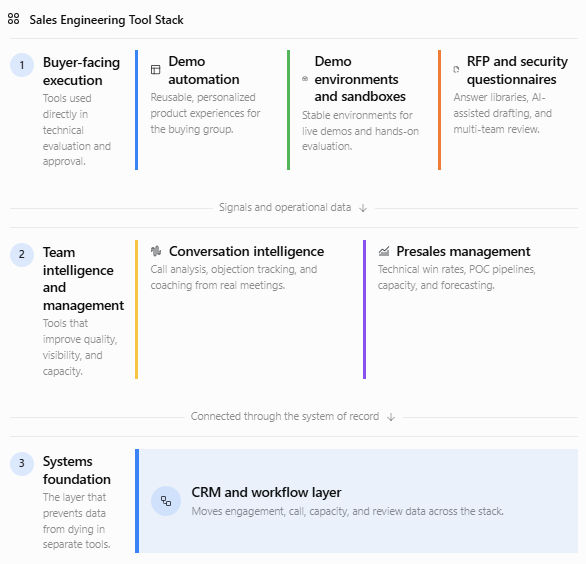
Demo automation platforms let teams build an interactive product demo once, personalize it per account, and share it through personalized demo links, so the standard walkthrough stops consuming SE calendar time and the whole buying group can evaluate asynchronously. The SE's live hours then concentrate on the evaluations that genuinely need an expert.
Demoboost is built for exactly this split: teams create interactive demos without engineering help, tailor them to each prospect, and share them via links or lead forms. Each demo doubles as a signal source: Revenue Intelligence scores every lead hot, warm, or cold based on demo engagement, with lead-level detail, filtering, period comparison, and CSV export, so the deal team sees who inside an account is actually evaluating.
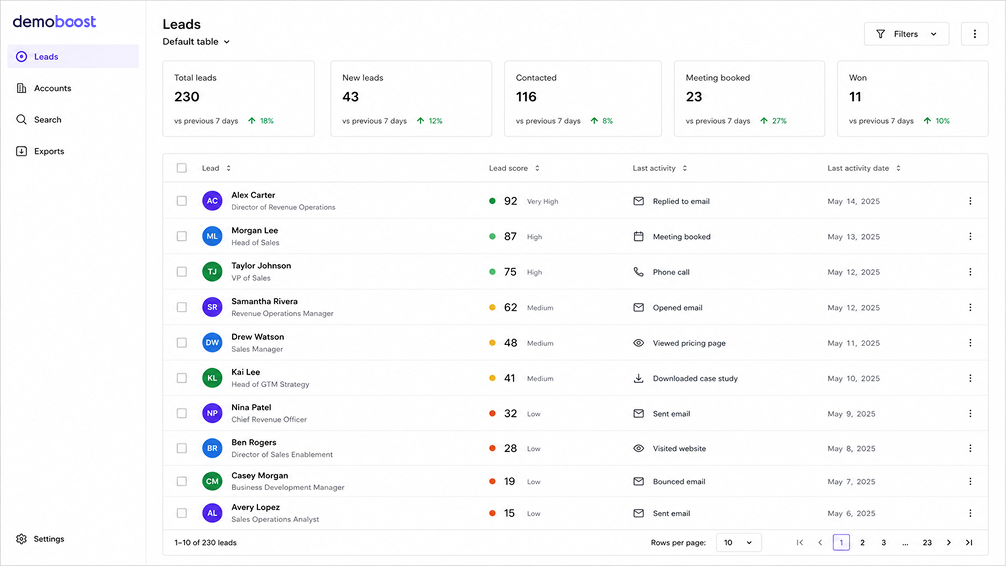
On the creation side, Demoboost AI applies prompt-based edits across an entire demo at once, swapping data, regions, industries, currencies, and dates per prospect, and translates demos into 170+ languages. The newest addition is Demoboost Wingman, an AI agent that rebuilds a demo screen from a single prompt, with multi-screen editing and demo actions planned next. Engagement data reaches the rest of the stack through Global Webhooks with Demo Tags in the payloads, routed via middleware such as Zapier, Make, or Workato, plus the built-in connections listed on Integrations.

Also evaluate: Storylane, Navattic, Walnut, Reprise, Demostack, Consensus, Arcade, Supademo, and Guideflow. The category splits roughly into capture-based interactive demos, video-led demos, and sandbox-first platforms, and vendors differ meaningfully on personalization depth, analytics, and enterprise controls. Visit [Comparison Hub]
Buy it when: SEs deliver the same intro demo more than a handful of times a month, or deals routinely involve stakeholders who never attend a live call. For most B2B software teams, both are true today.

What it solves: live demos breaking at the worst moment. Production-adjacent demo instances accumulate messy data, half-configured features, and surprises. Dedicated demo environments give SEs a stable, realistic, preconfigured place to demo live and, for technical evaluations, a space buyers can explore hands-on.
This category overlaps with demo automation at the edges, and several vendors above offer sandbox capabilities. The distinction that matters: interactive demos are built assets you share, sandboxes are live environments you enter. Technical buyers running a proof of concept usually want the second. Everyone earlier in the funnel is better served by the first.
Buy it when: your product's live demo depends on realistic data states, or technical evaluators regularly ask for hands-on access before a POC.
What it solves: the fact that nobody can review every technical call. These platforms record, transcribe, and analyze meetings, flag objections and competitor mentions, and give presales leaders a way to coach on real calls instead of secondhand summaries.
Evaluate: Gong for mid-market and enterprise teams with meaningful call volume, Avoma as a more accessible entry point with sales-specific scorecards.
Buy it when: the SE team is large enough that demo quality varies by person, or technical win rates differ across reps and nobody can say why.
What it solves: the documentation grind. RFPs and security questionnaires are among the most time-expensive artifacts in enterprise sales, routinely pulling SEs, legal, and security into the same spreadsheet for days. Response platforms maintain an answer library, draft responses with AI assistance, and manage the multi-team review.
Evaluate: Loopio and Responsive are the established platforms in this space, and a newer wave of AI-first tools is emerging around them.
Buy it when: enterprise deals are a meaningful share of the pipeline and questionnaire turnaround is measured in weeks. Below that threshold, a well-maintained internal answer library covers most of the value.
What it solves: presales being invisible in the CRM. Most CRMs model the AE's world, not the SE's, so technical win rates, POC pipelines, and SE capacity live in spreadsheets if they live anywhere. Presales management platforms give the function its own system of record.
Evaluate: Vivun is the best-known dedicated platform. Many teams alternatively extend their existing CRM with custom objects, which costs admin time but avoids another subscription.
Buy it when: the SE team is roughly ten people or more, or presales leadership needs to defend headcount with data. Smaller teams get more value from the categories above.
What it solves: everything above producing data that dies in its own tab. The CRM (Salesforce, HubSpot, or otherwise) remains the system of record, and middleware platforms like Zapier, Make, and Workato are how webhook-based tools feed it. Whatever you buy from categories one through five, budget the ops time to wire it in. A demo engagement signal that never reaches the account record might as well not exist.
A sequencing recommendation, since budgets rarely cover the full list.
First, demo automation. It attacks the largest recurring time cost, it serves AEs and marketing as well as SEs, and it produces buyer engagement data the rest of the stack can use. This is also the category where the payback logic is simplest: count the hours currently spent on repeat demos.
Second, whichever bottleneck your deals actually hit. Enterprise-heavy pipelines usually feel RFP pain next. High-velocity teams with variable demo quality get more from conversation intelligence. There is no universal second purchase, only your pipeline's specific friction.
Third, presales management, once the team and its data volume justify a system of record.
Throughout, protect ops capacity for the workflow layer. A smaller stack that is properly wired into the CRM beats a larger one that is not.
1. What are sales engineering tools?
Sales engineering tools are software products that support the technical side of B2B sales: building and sharing product demos, maintaining demo environments, analyzing sales calls, responding to RFPs and security questionnaires, and tracking presales work. They exist to reduce the repetitive workload on sales engineers so their expert time goes to the evaluations that need it.
2. What is the difference between demo automation and a sandbox demo?
Demo automation produces interactive demos: built assets a team creates once, personalizes, and shares by link, typically used before and after live calls and across the buying group. A sandbox is a live, preconfigured product environment a buyer or SE works inside, typically used for hands-on technical evaluation. Many teams eventually use both, at different funnel stages.
3. Which sales engineering tool should a small presales team buy first?
For most B2B software teams, demo automation, because repetitive demo delivery is usually the largest recurring cost of SE time and the tool also serves AEs and marketing. After that, buy against your specific bottleneck: RFP software if enterprise questionnaires stall deals, conversation intelligence if demo quality varies across the team.
4. How do sales engineering tools connect to a CRM?
Architectures vary by vendor: some connect directly, others expose webhooks that route through middleware platforms like Zapier, Make, or Workato into the CRM. Demoboost, for example, sends demo engagement events through Global Webhooks via middleware, alongside the built-in connections listed on its integrations page. Before buying any tool, confirm which fields sync, in which direction, and who maintains the connection.
5. How do you measure whether a sales engineering tool is working?
Assign each tool one metric before purchase and review it quarterly. Demo automation maps to SE hours per deal and evaluation-stage conversion, RFP software to response turnaround time, conversation intelligence to technical win rate consistency, presales management to forecast accuracy on technical evaluations. A tool without a metric attached tends to become shelfware without anyone noticing.
Book a live demo to see how Demoboost helps your team cut demo prep time, qualify buyers faster, and focus on real opportunities.
Book a Live Demo

.png)
.png)
