Enterprise Demo Automation Platform for Secure, Governed Demo Delivery

Scale interactive demos across teams, regions, products, and partners without losing control over access, content quality, or buyer data.

Demoboost gives enterprise revenue organizations one governed platform for creating, organizing, delivering, and measuring product demos across sales, presales, marketing, customer success, and channel teams.

Trusted by revenue teams at


Bosch Logo
Celonis Logo
boost.ai Logo
Ave point Logo
pwc Logo
Guide-cx Logo
veritas Logo
voxel Logo
conqure Logo
amcs Logo
3ds Logo
supplyOn Logo
supplyOn Logo
Vivun Logo
Hitachi Logo
Evercam Logo
tis Logo
elmo Logo
elmo Logo
Radiant Security Logo
Bosch Logo
Celonis Logo
boost.ai Logo
Ave point Logo
pwc Logo
Guide-cx Logo
veritas Logo
voxel Logo
conqure Logo
amcs Logo
3ds Logo
supplyOn Logo
supplyOn Logo
Vivun Logo
Hitachi Logo
Evercam Logo
tis Logo
elmo Logo
elmo Logo
Radiant Security Logo
Enterprise governance
Security and access
Enterprise checklist
Procurement and IT
FAQ

What is enterprise demo automation?

Enterprise demo automation is the system a large revenue organization uses to create, govern, distribute, and measure product demos across teams, products, regions, and partner networks.

Unlike a basic demo builder, an enterprise demo automation platform must help organizations maintain clear access controls, approved content, consistent branding, secure data handling, and measurable demo performance as their demo program grows.

Demoboost combines demo creation and delivery with structured libraries, role-based permissions, partner access, analytics, revenue workflows, and ongoing enterprise support.

Scale demo delivery without creating demo chaos

Enterprise teams rarely struggle to create one demo. The challenge is keeping hundreds of demos organized, current, secure, and useful across a growing organization.

Different teams need different experiences for products, industries, personas, regions, and sales stages. Without clear governance, sellers lose track of which assets are approved, content becomes outdated, and demo quality depends too heavily on individual knowledge.

Demoboost gives teams a shared operating model for demo delivery.

Control who can create, edit, and present

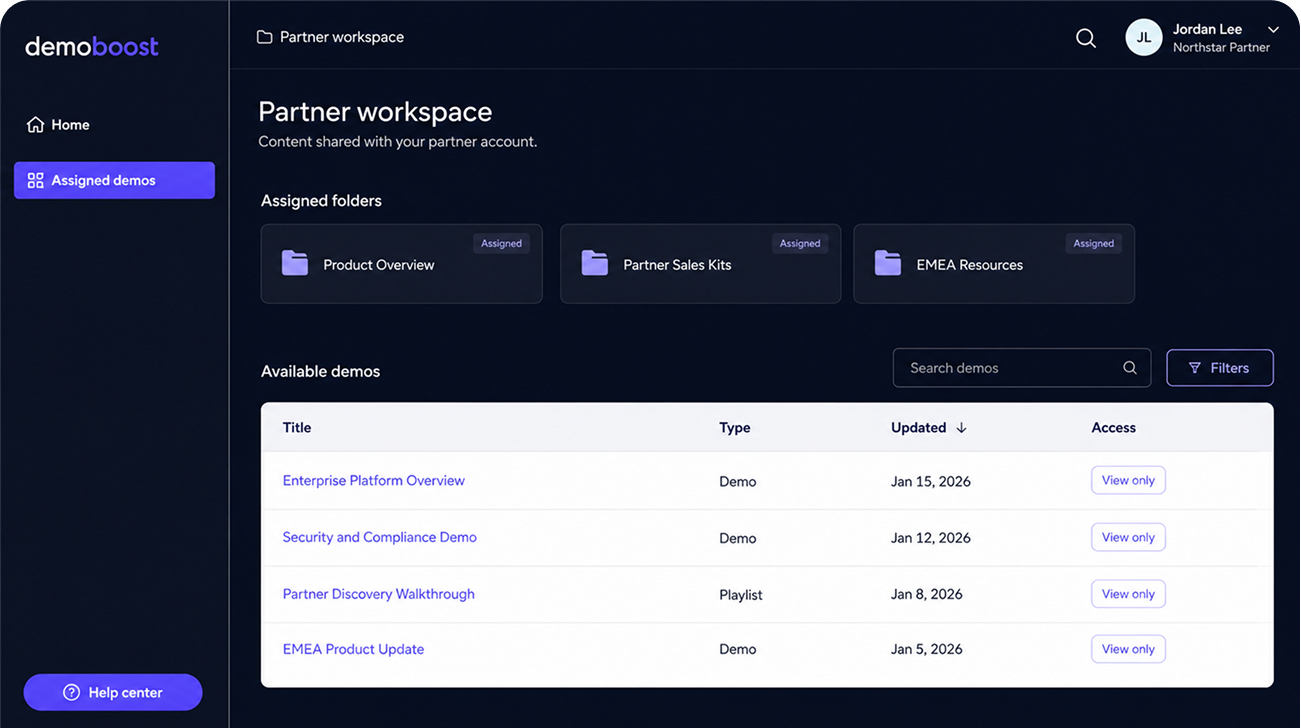
Assign access based on each person's responsibility. Administrators manage the organization, creators build and maintain assets, presenters work within shared libraries, and partners access only the content assigned to them.

Organize demos around how your business works

Use folders, nested subfolders, and organization-wide tags to structure demo libraries by product, region, persona, industry, team, or sales stage.

Reuse approved demo foundations

Create reusable templates and duplicate approved assets instead of rebuilding every experience from the beginning. Give teams a consistent starting point while preserving room for controlled personalization.

Keep the library current

Make active demos easy to find, archive outdated assets, and maintain a clear distinction between approved content and experiences that should no longer be used.

Organize enterprise demo delivery with nested libraries, approved templates, organization tags, and a clear archiving workflow.

Give every team access to the right demo, not every demo

Enterprise governance should make approved content easier to use without giving every user unrestricted access to the full workspace.

Demoboost supports four workspace roles with different levels of control.

Role

Admin

Admin

Admin

Admin

Primary responsibility

Organization governance

Demo creation and maintenance

Demo delivery

Controlled external delivery

Typical access

Manage users and settings, create and edit demos, control access, and review organization-wide analytics

Create, edit, organize, and share demos, manage shared content, and review analytics

Work with shared libraries and speaker notes, edit and share within their assigned access, and review analytics

Access a designated partner library, use approved content and speaker notes, and view analytics for their own activity

Teams can provide presenters and partners with the content they need while keeping the rest of the workspace, source assets, and internal demo library protected.

Standardize the experience without standardizing every conversation

Governance should protect demo quality without forcing every seller to deliver the same rigid presentation.

Demoboost helps enterprise teams codify their best demo practices through:

Reusable demo foundations

Shared libraries of approved assets

Speaker notes and delivery guidance

Role-specific demo flows

Demo playlists and collections

Controlled duplication and personalization

Central themes and branding

Organization-wide tags and naming standards

Sales, presales, and partner teams can begin with an approved product story, then adapt the delivery to the buyer in front of them.

Adam Seens
Advanced Solutions
Specialist, Avaya

“The opportunity with Demoboost is to take those existing frameworks and elevate them, adding speaker notes, interactivity, and the kind of customization that makes each demo truly impactful.”

Secure access without slowing teams down

Enterprise organizations need to make demos widely available without giving every user unrestricted control or exposing sensitive production systems.

Demoboost combines centralized authentication, role-based access, EU data residency, and independently certified security practices to support secure enterprise deployment.

Centralized identity and access

Use enterprise SSO with SAML 2.0, compatible with Okta, Azure AD, and other major enterprise identity providers.

Apply role-based permissions so users access and manage only the content relevant to their responsibilities.

EU data residency

Customer PII is hosted in the European Union using AWS infrastructure in Frankfurt, Germany, in the eu-central-1 region.

Independently certified security

Demoboost maintains an ISO/IEC 27001-certified information security management system covering the production, development, and verification of software within the Demo Experience.

Product experiences separated from production

Captured demo experiences are structurally decoupled from production backends, databases, and APIs. Teams can present controlled product experiences without exposing the live product environment.

For certification details, technical architecture, encryption controls, infrastructure monitoring, and security documentation, visit the Demoboost Security Trust Center.

What enterprise teams should look for in demo automation software

Enterprise governance should make approved content easier to use without giving every user unrestricted access to the full workspace.

Demoboost supports four workspace roles with different levels of control.

Enterprise requirement
Single Sign-On
Role-based permissions
Folders and libraries
Approved templates and controlled reuse
EU hosting and GDPR
ISO and security controls
CRM and revenue-tool connectivity
Partner access
Analytics
Professional services
What to evaluate
Can authentication be managed through the organization's identity provider?
Can access differ between administrators, creators, presenters, and external partners?
Can demos be organized by product, region, team, persona, or use case?
Can teams start from approved content without giving every user control over the source asset?
Where is customer data processed and stored?
Is the vendor independently certified, and can IT review its controls?
Can demo activity enter existing revenue workflows?
Can external sellers use approved demos without accessing the full internal library?
Can teams measure buyer engagement, demo performance, and platform usage?
Will the vendor help implement, optimize, and scale the program?
Demoboost approach
Enterprise SSO using SAML 2.0, compatible with Okta, Azure AD, and major identity providers
Four roles with different workspace, creation, delivery, and analytics permissions
Nested folders, shared libraries, organization-wide tags, and archiving
Reusable templates, duplication workflows, and isolated Partner access
Customer PII hosted in AWS Frankfurt with EU data residency and GDPR-ready data handling
ISO/IEC 27001 certification with supporting information in the Security Trust Center
Global Webhooks routed through middleware such as Zapier, Make, or Workmate
Isolated Partner access to designated folders and assets
Demo analytics and Revenue Intelligence with role-appropriate access
Dedicated customer success, professional services, strategy support, optimization reviews, and priority support

Extend governed demo delivery to channel partners

Partner enablement introduces a specific governance challenge.

Partners need fast access to credible product stories, but they should not need access to every internal demo, customer experience, or source asset.

With Demoboost, enterprise teams can:

Give partners access to designated demo folders

Prevent partners from editing original demo assets

Provide approved templates, narratives, and speaker notes

Let partners present and share the experiences available to them

Limit visibility to content relevant to each partner

Keep partner analytics separate so each partner sees only their own activity

This helps organizations scale consistent demo delivery across their partner ecosystem while keeping content ownership and governance with the central team.

Learn how to connect Demoboost to your revenue stack

Give external partners a restricted workspace containing only the folders and demo assets assigned to them.

Connect enterprise demo activity to your revenue stack

Enterprise demo programs should not create another isolated source of buyer data.

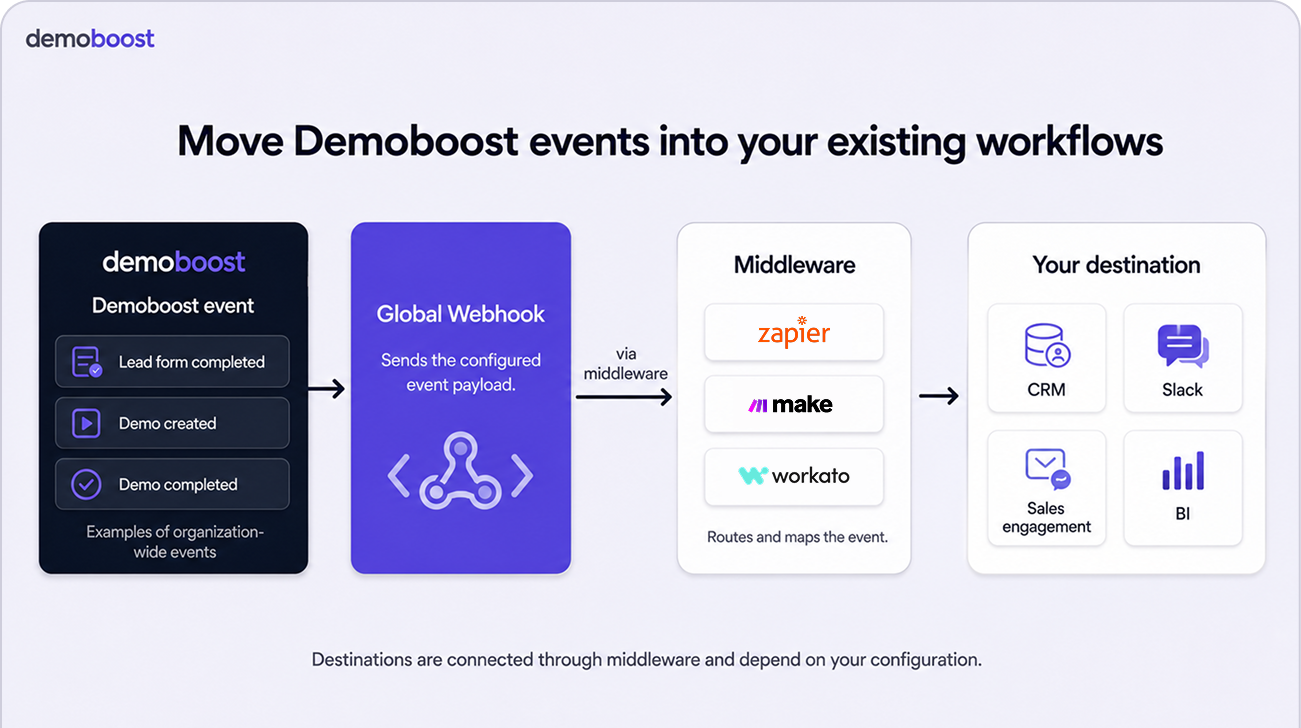
Demoboost uses Global Webhooks to move selected demo events into CRM, marketing automation, communication, sales engagement, and reporting workflows.

Global Webhooks currently support three triggers:

Lead Form Submitted

Demo Completed

Demo Created

Using middleware such as Zapier, Make, or Workato, teams can use these events to:

Let partners present and share the experiences available to them

Let partners present and share the experiences available to them

Keep partner analytics separate so each partner sees only their own activity

Give external partners a restricted workspace containing only the folders and demo assets assigned to them.

Detailed engagement information remains available inside Demoboost analytics, giving teams additional context behind each event.

Learn how to connect Demoboost to your revenue stack

Support adoption after the platform goes live

Enterprise demo automation is not only a software deployment. It changes how teams create, govern, deliver, and learn from demos.

The Demoboost Enterprise plan includes support for larger rollouts:

Dedicated Customer Success Manager

Professional services

Demo strategy sessions

Monthly demo optimization reviews

Priority service levels

Custom seats

Roadmap alignment and product feedback

This gives demo operations, presales, enablement, and revenue teams ongoing support as their program expands.

Enterprise demo automation in practice

Enable a global sales organization

Create a structured library of approved demos for different products, personas, industries, and selling situations. Give sellers the assets and speaker guidance they need without requiring Solutions Engineers to support every standard conversation.

Govern demos across business units

Use folders, tags, access roles, and shared standards to organize content across regions and product lines while keeping ownership clear.

Support external partner delivery

Give partners controlled access to selected demo experiences while protecting the wider internal workspace and original content.

Reduce reliance on production environments

Provide stable, repeatable demo experiences without connecting every presentation to a live backend or depending on a production environment being available.

Enterprise scale in practice

Bosch created more than 100 demo tutorials to support thousands of users across an organization of more than 10,000 employees.

Read the Bosch customer story

Scale demos without losing control

Give every internal team and partner access to the right product story while maintaining clear ownership over content, permissions, security, and performance.