




1. Build a Persona-Based Demo Library
Create a Choose Your Own Journey demo structure organized by buyer personas and their top challenges.
Structure your library:
- Identify key personas involved in buying decisions (e.g., Sales Leaders, CS Managers, IT Admins)
- List top 3 challenges per persona using buyer language, not product jargon
- Build focused micro-demos (5-10 screens) addressing each challenge
- Start with success stories – Open each demo with how a similar customer solved this problem
Match depth to audience:
- Executives: Focus on outcomes, dashboards, and business impact
- Managers: Show operational workflows and team benefits
- Practitioners: Demonstrate hands-on features and daily-use scenarios
This allows reps to guide discovery while staying inside a structured framework.
Demoboost Implementation:
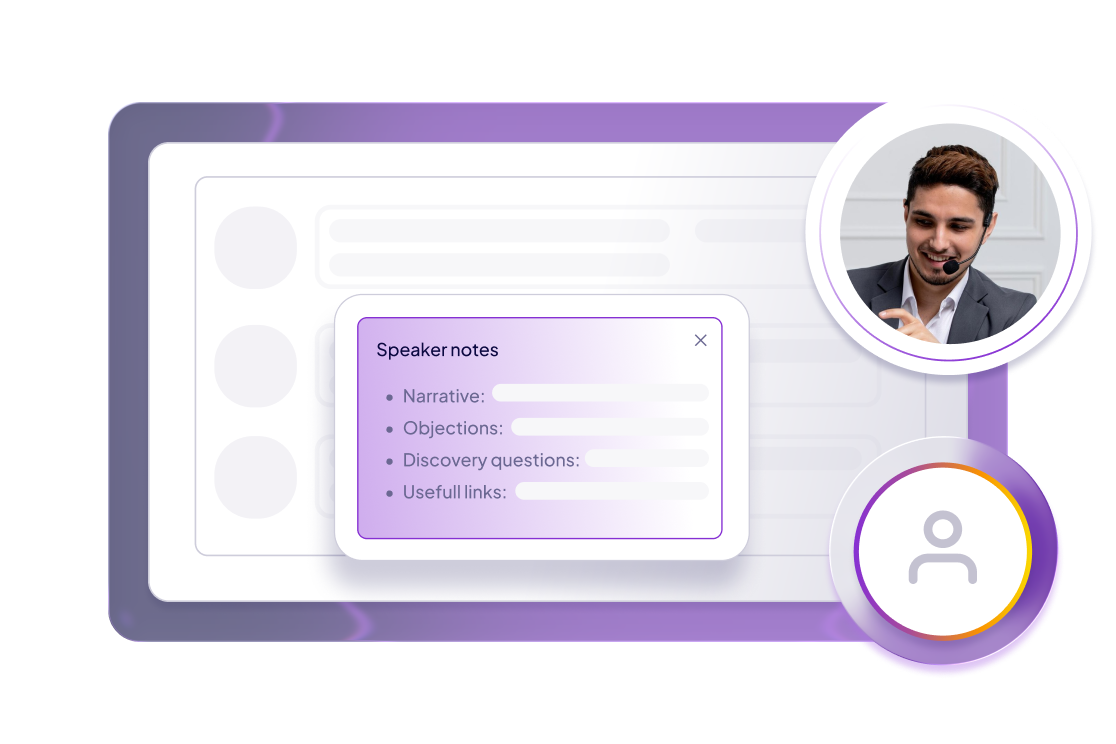
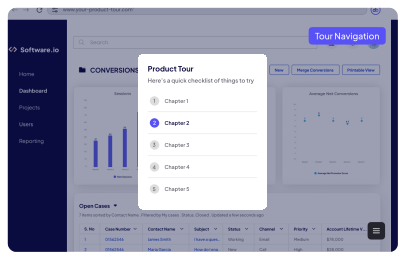
Build demo playlists organized by persona | Use Choose Your Own Journey entry screens for challenge selection | Create Speaker Notes with discovery questions per screen | Enable menu-based navigation for flexible exploration
2. Choose the Right Demo Structure
Match demo format to deal complexity and buyer maturity:
Linear Demo
Best for:
Intro calls and early discovery
Content:
8-10 key screens with one clear click path
Duration:
10 minutes maximum
Benefit:
Fast, focused, easy for reps to deliver consistently
Linear Demo with Navigation Menu
Best for:
Buyers who understand the problem and have specific questions
Content:
Linear path plus table of contents for jumping to sections
Benefit:
Balances structure with real-time personalization based on questions
Sandbox Demo
Best for:
Complex deals, advanced buyers, and experienced AEs
Content:
Full product replica with features toggled on/off as needed
Benefit:
Enables deep exploration while maintaining agreed talk track
Demoboost Implementation:
Language: Express these painpoints succinctly using terms and language familiar to the buyers—avoid jargon or company-specific vocabulary.
3. Enable Reps with Speaker Notes
Equip sales teams with in-demo guidance that ensures consistency without sounding scripted.
What to include in Speaker Notes
- Where we are: Context for this screen or workflow
- What's visible: Key elements the prospect should notice
- Why it matters: Business value tied to their challenge
- Discovery questions: Prompts to uncover needs and qualify fit
- Objection handling: Responses to common concerns
- Supporting materials: Links to case studies, docs, or resources
Format: Keep notes bullet-pointed and conversational, not word-for-word scripts.
Demoboost Implementation:
Add Speaker Notes to each demo screen | Include discovery questions and objection responses | Link to supporting resources | Make notes visible only to presenter, not prospect
4. Customize Before the Call
Pre-call preparation:
- Research the account: Industry, role, and stated challenges
- Select the right demo path: Match persona and primary pain point
- Personalize the experience: Use Variables to insert prospect company name, logo, or relevant data
- Enable Live Demo Mode: Connect demo engagement to CRM opportunity for tracking
Post-call follow-up:
- Share the demo immediately: Send as leave-behind for internal sharing and reinforcement
- Track engagement: Monitor who views it, how long they spend, and what they explore
- Alert the rep: Trigger notifications when prospects re-engage with the demo
Demoboost Implementation:
Apply Playback Settings to tailor shared demos (show/hide guides and navigation), send shortened follow-up versions of live demos, and track engagement via CRM sync and real-time alerts.
5. Best Practices
Start with Discovery, Not Demo
Ask qualifying questions first, then tailor the demo path based on responses.
Use Buyer Language
Avoid product jargon and internal terminology. Frame features as solutions to their challenges.
Keep Intro Demos Short
Target 10-15 minutes for first calls. Save depth for later-stage technical demos.
Let Presales Focus on Complex Deals
Enable AEs to handle intro demos independently, reserving presales for high-value opportunities and deep technical validation.
Make Demos Shareable
Every live demo should be followable by a shareable version that prospects can revisit and distribute internally.
6. Role in the Buyer Journey
At the Consideration stage, live demos:
- Shift the conversation from "what is this product" to "how does this solve my problem"
- Qualify opportunities efficiently without heavy presales involvement on every early call
- Create clear handoffs to deeper evaluation demos and technical validation
- Enable champion enablement by providing shareable assets for internal distribution
Live demos act as the bridge between marketing education and sales validation—structured enough to scale, flexible enough to feel personal.
7. Success Metrics (live-demo & discovery call patterns)
Engagement
- Demo delivery rate: % of discovery calls where a live demo is actually shown – top-performing reps reach 80–90%+
- Completion rate during calls: How many demos run through the core workflow without drop-off – signals attention and relevance.
- Navigation paths explored: Tracks which features, modules, or outcomes buyers focus on; reveals priorities and pain points in real time.
Qualification & Sales Signal:
- Demo-to-next-meeting conversion rate: Higher rates indicate effective alignment between discovery insights and solution presentation.
- Presales escalation rate: Measures how many introductory demos trigger SE or technical involvement – flags complex or high-value opportunities.
- Time to qualification: Live demos often accelerate lead qualification, shortening sales cycle compared with discovery calls without demos.
Pipeline & Deal Impact:
- Opportunity progression speed: Deals with live demo engagement move through stages faster than those without.
- Win rate comparison: Early demo touchpoints correlate with higher close rates versus opportunities that start with static discussions.
- AE self-sufficiency: % of intro demos delivered successfully without presales support – useful for scaling demo coverage across reps.
Demoboost Analytics tracks demo delivery, engagement patterns, and opportunity associations in real time, providing rep-level dashboards for coaching and performance improvement.
8. Common Pitfalls to Avoid
- Leading with the demo before discovery – Always qualify pain points first, then show relevant solutions.
- Using a one-size-fits-all demo – Customize for persona, role, and industry context.
- Focusing on features instead of outcomes – Tell the “why it matters” story to drive impact.
- Relying on unstable demo environments – Ensure consistent experience with Tours or Overlays.
- Not sharing demos after calls – Provide leave-behinds for reinforcement and internal review.
- No speaker notes for new reps – Standardize messaging to maintain demo quality across the team.