.webp)




1. Build Multi-Stakeholder Demo Paths
B2B buying decisions involve 5-7+ stakeholders with different priorities. Use Choose Your Own Journey to let one demo serve multiple audiences without scheduling separate meetings for each.
Structure:
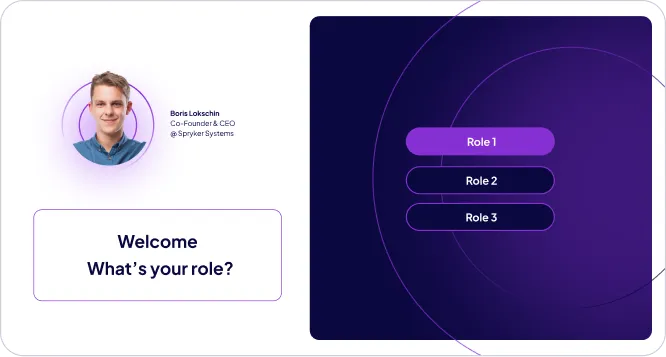
Role-selection entry screen:
- Executive
- Manager/Department Head
- End User/Practitioner
- Technical Evaluator
Tailored demo paths per role:
- C-level: Business impact, ROI, revenue growth, cost reduction, strategic alignment
- Managers: Workflow efficiency, team productivity, operational visibility, adoption ease
- End users: Daily task improvement, time savings, ease of use, interface simplicity
- Technical buyers: Integration capabilities, security, scalability, technical architecture
This allows one leave-behind asset to address the entire buying committee without narrative fragmentation.
Demoboost Implementation:
Use Digital Sales Rooms to centralize demos and content | Track engagement across all assets in the room | Set up real-time alerts when new stakeholders engage | Monitor which materials resonate most per account
Try our Add-ons to increase your demos’ engagement and interactivity.
2. Personalize the Experience
Maintain continuity with the live conversation through personalization.
For attendees of the live call:
- Reference specific questions or topics discussed
- Highlight areas they expressed interest in
- Acknowledge next steps agreed upon
For stakeholders who weren't on the call:
- Introduce yourself and your company
- Explain why the demo was shared with them (e.g., "Your colleague [name] thought you'd find this relevant to [challenge]")
- Guide them to sections most relevant to their role
Personalization tactics:
Use Variables to insert:
- Prospect company name
- Industry-specific examples
- Use cases discussed during the call
Post-call follow-up:
- Mention prospect's name and company
- Reference key discussion points
- Provide guided commentary on critical screens
Post-call follow-up:
- “Questions? Contact [sales rep name] at [email]”
- “Is this relevant for your team? Share it with [specific role]”
Demoboost Implementation:
Use Variables for company and context personalization | Add Video Narration for personalized walkthroughs | Configure floating share buttons for easy internal distribution
3. Embed Strategic CTAs
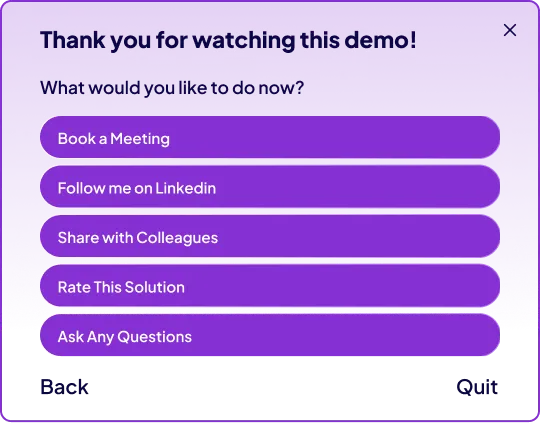
Guide prospects toward logical next steps with clear, contextual calls to action.
Common leave-behind CTAs:
High intent:
- "Book a follow-up meeting" (link to calendar)
- "Schedule a technical deep-dive"
Medium intent:
- "Ask a question" (open comment form or contact link)
- "Explore [specific feature] in depth"
Collaboration:
- "Share with your team" (enable forwarding with tracking)
- "Forward to [specific role]" (e.g., "Share with your IT team")
Feedback:
- "Rate this solution" (NPS or quick survey)
- "Tell us what resonates most"
Principle: CTAs should support evaluation, not force premature conversion. Match urgency to buying stage.
Demoboost Implementation:
Use custom ending screens with tiered CTAs | Add floating CTAs for persistent access to actions | Include calendar links for frictionless meeting booking | Enable trackable share links to monitor internal distribution
4. Distribution Strategy
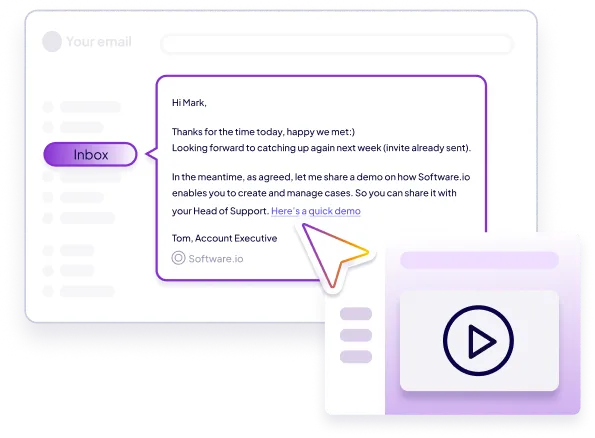
Email Follow-Up (Standard Approach)
- Position as a recap tool: "Here's what we covered today, plus additional context for your team"
- Include specific sections to explore: "Check out the [workflow] section for the use case we discussed"
- Encourage sharing: "Feel free to forward this to [relevant stakeholders]"
Digital Sales Rooms (High-Priority Deals)
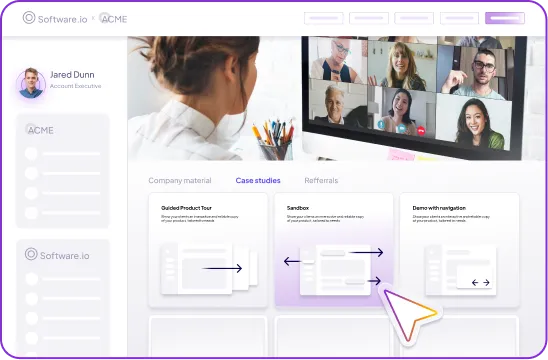
For strategic opportunities, create a dedicated account hub that includes:
- The interactive demo (with multi-stakeholder paths)
- Supporting content (case studies, ROI calculators, technical docs)
- Clear next-step actions (meeting links, contact info)
- Engagement tracking across all assets
This centralizes all evaluation materials in one place, making it easy for champions to guide internal stakeholders.
Demoboost Implementation:
Use Digital Sales Rooms to centralize demos and content | Track engagement across all assets in the room | Set up real-time alerts when new stakeholders engage | Monitor which materials resonate most per account
5. Best Practices
Send Within 24 Hours
Share leave-behinds while the conversation is still fresh. Delays reduce engagement and momentum.
Make Sharing Effortless
Include explicit permission and encouragement to forward internally. Remove friction from champion advocacy.
Track Who Engages
Monitor which stakeholders view the demo, how long they spend, and which sections they explore. This reveals buying committee dynamics and hidden influencers.
Follow Up on Engagement
When new stakeholders view the demo, reach out proactively: "I saw [name] from your team explore the demo—happy to answer any questions they might have."
Keep It Focused
Leave-behinds should reinforce the live call, not introduce entirely new topics. Stay aligned with the conversation you had.
6. Role in the Buyer Journey
At the Consideration stage, sales leave-behind demos:
- Extend the sales narrative beyond live calls, maintaining momentum between meetings
- Enable champion advocacy by giving internal advocates assets they can confidently share
- Reduce meeting fatigue by eliminating repetitive "catch-up" calls for latecomers
- Surface hidden stakeholders through engagement tracking and internal sharing patterns
Leave-behinds transform demos from one-time presentations into reusable decision-support assets that work on your behalf 24/7.
7. Success Metrics (industry patterns)
Engagement
- Time to first view : On average, it takes 4–5 days for buyers to open a leave-behind demo or product tour. Rapid openers (<48h) show 2–3× higher intent.
- Replay and download rate: 25–35% of viewers revisit demos; repeated engagement signals high-priority opportunities.
- Average demo view completion: 55–65% for short, benefit-focused demos; modular tours with chapters maintain attention better than long-form content.
Intent Signals
- Internal sharing: 40–60% of leave-behind demos are forwarded within buying committees; each forwarded demo uncovers 3–5 new stakeholders on average.
- Repeat viewer activity: Buyers who engage with a demo multiple times within 30 days are 4–5× more likely to request a meeting.
- Interaction depth: High-intent buyers explore optional content (tooltips, expandable sections) and engage with CTAs at the end of the demo.
Sales Impact
- Meeting requests post-demo:20–30% of viewers convert into meetings when demos are accessible, easy to share, and personalized..
- Pipeline acceleration : Deals where leave-behind demos are actively used show 1.5–2× faster decision-making cycles.
- Win rate lift : Engaged opportunities with leave-behind demo interactions have 20–35% higher close rates than opportunities without post-demo content.
Demoboost Analytics tracks leave-behind content per stakeholder, showing which demos are rewatched, shared, or trigger CTAs, enabling precise targeting of follow-up communications.
8. Common Pitfalls to Avoid
- Assuming first-viewers are all high intent – repeated engagement matters more than a single click.
- Leaving demos static – without periodic updates, content becomes stale; buyers disengage after 2–3 weeks.
- Overloading with too many optional paths – too many choices increase decision paralysis; limit optional content to 2–3 extensions.
- Poor visibility in follow-ups – don’t bury demos in emails or attachments; provide a clear, single link to access content.
- No tracking of internal sharing – missing signals from forwarded demos prevents identification of hidden stakeholders.
- Weak CTAs – unclear next steps reduce the likelihood of converting post-demo engagement into sales meetings.