
.png)
Learn how presales is evolving and howyour team can stay ahead in atech-driven sales landscape.

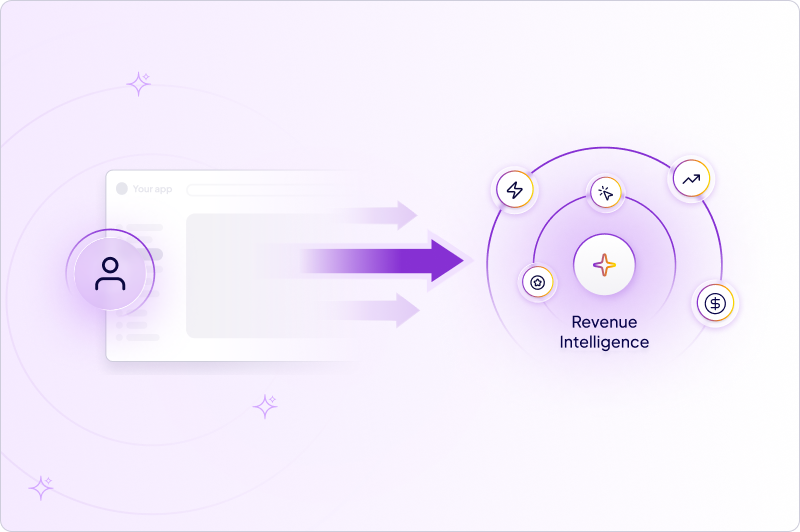
Revenue Intelligence is the layer that turns demo engagement into a first-party signal about which buyers are genuinely interested and which are just browsing. AI already made demos fast and cheap to build, so the lasting advantage is no longer creation. It is reading what buyers do once they are inside the demo. Demoboost's Revenue Intelligence identifies leads from real demo activity, assigns each one a lead score, lets you search, filter, and compare them across time, and passes that data to your other tools. This is the fourth and final article in our series on the state of AI in demo automation.
For most of the last decade, the hard part of a demo was making it. Initially, it required coding skills to demonstrate specific use case or process and fill it in with data so it tells the story. Emergence of the Demo Automation platform made it easier with the capturing mechanisms and no-code editors. Still, someone had to manually capture the product, build the flow, write the annotations, and rebuild everything when the UI changed. AI has compressed that work. Branding, copy, data views, and translations that used to take days now take minutes.
That is genuinely useful and it it solves the major blocker in the software sales processWhen every team can produce a polished, personalized demo quickly, the demo itself stops being a differentiator. What is left is the data. Every demo a buyer opens produces a stream of behavior: what they viewed, how long they stayed, which sections they returned to, whether they shared it internally. That stream is the part competitors cannot copy, because it is specific to your product and your buyers. Reading it well is the real prize.
Demo-Led Revenue Intelligence is Demoboost's layer for capturing demo engagement and turning it into a picture of buyer interest. Instead of leaving analytics scattered across individual demos, it collects the signals in one place and organizes them around the people generating them.
The practical output is a list of leads, each carrying a lead score that reflects how engaged they are. Two separate things happen to a lead along the way, and it helps to keep them apart. A lead becomes identified when they give you enough to know who they are, by completing a lead form on a demo. Identification is a state, not a score. It tells you who the person is, not how interested they are. The lead score is the intent measure: every lead is rated hot, warm, or cold based on their behavior, for example completing a demo, returning to it, or moving through a use-case flow rather than glancing at a single screen.
The goal is simple. Point your team at the buyers and opportunities who are showing real purchase intent, and stop spending equal effort on everyone.
The Leads view is built to answer one question fast: who is worth a follow-up right now?
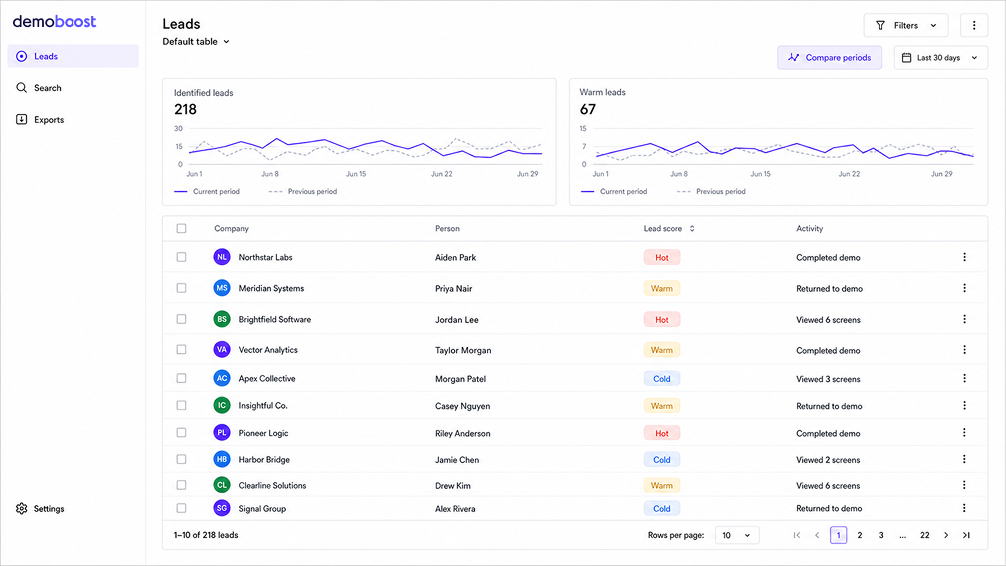
At the top, you get counts that frame the picture, including how many leads have been identified and how many are warm. Below that sits the lead list itself, with the company, the person, their lead score, and recent activity.
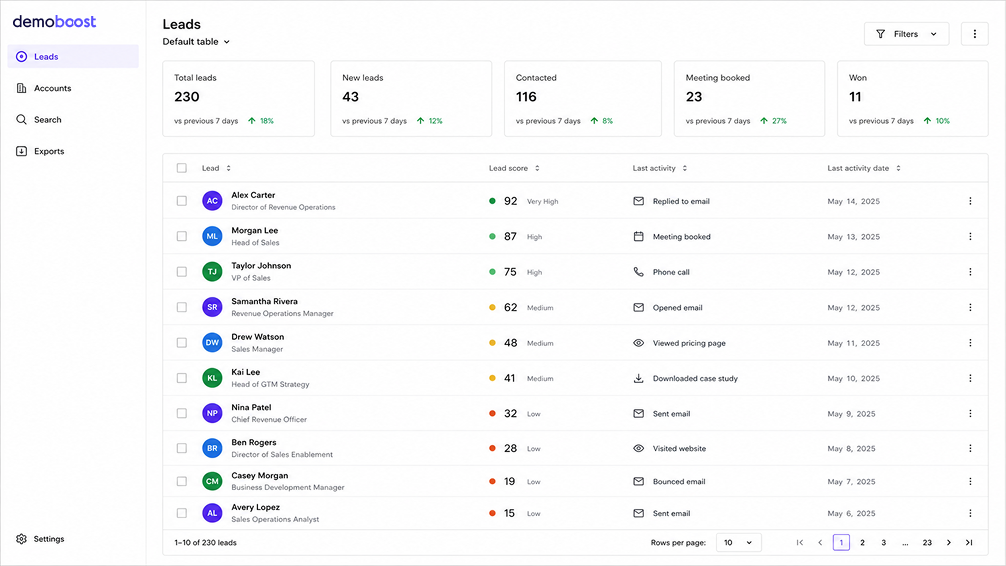
Demoboost's Revenue Intelligence Leads view: identified and warm lead counts, with each lead carrying a hot, warm, or cold score.
From there you can:
Search the list by name or company to jump straight to a specific lead or account you care about. When nothing matches, the view says so plainly rather than leaving you guessing.
Filter by lead score and date so you can narrow to, for example, warm leads from the last two weeks instead of scrolling the whole list.
Compare periods by turning on the comparison toggle, choosing a preset range or custom dates, and reading the trend lines the dashboard draws for the current window against the previous one. This is how you see whether interest is building or cooling, not just what today looks like.
Export to CSV in a couple of clicks when you want to work with the list elsewhere or hand it to another team, with a confirmation once the file is ready.
None of this asks you to build a report from scratch. The view is the report, and it updates as buyers keep engaging.
The list is where you start, not where the insight is. The insight sits one level down, in the view of how a specific person moved through your demo.
Open a lead and you get their engagement broken into two layers.
The first layer calls out what mattered most. Rather than making you read a log and draw your own conclusions, the view surfaces the highlights of the session:
The second layer is the full step-by-step record of the session, in order. This is what you read when the highlights raise a question and you want the detail behind them.
Together the two layers change the kind of conversation you can have. Knowing a lead is warm tells you to follow up. Knowing they spent most of their time on your permissions and governance screens, re-engaged with the integration flow, and then dropped off at pricing tells you what to follow up about. That is the difference between a prioritized list and a prepared call.
Most B2B funnels run on page visits, ad clicks, form fills, and third-party intent feeds. Those signals tell you that someone engaged with your brand and the category. They do not tell you what the person cared about once they saw the product.
Demo engagement closes that gap. A buyer who completes a five-minute use-case demo, returns to it the next day, and shares it internally is telling you something a PDF download never could. They have moved from brand curiosity to product evaluation, and they have shown you which part of the product matters to them. That is why demo data works well as a lead-scoring input rather than a replacement for it. The demo sharing helps you build decision stakeholders maps within the buying organisation and understand what every specific stakeholder is interested in. Layered on top of your existing signals, it separates the buyers who are seriously evaluating from the ones who are only aware you exist.
Through Global Webhooks. This is an organisation-wide configuration that sends demo data to any tool that accepts a webhook, reaching thousands of apps through middleware like Zapier, Make, and Workato.
Global Webhooks fire on three events: lead form completed, demo created, and demo completed. You set the webhook up once at the org level, and it works across every demo rather than needing separate configuration per demo. From there, lead and engagement data can flow into your CRM, Slack, a spreadsheet, or a marketing automation platform in real time.
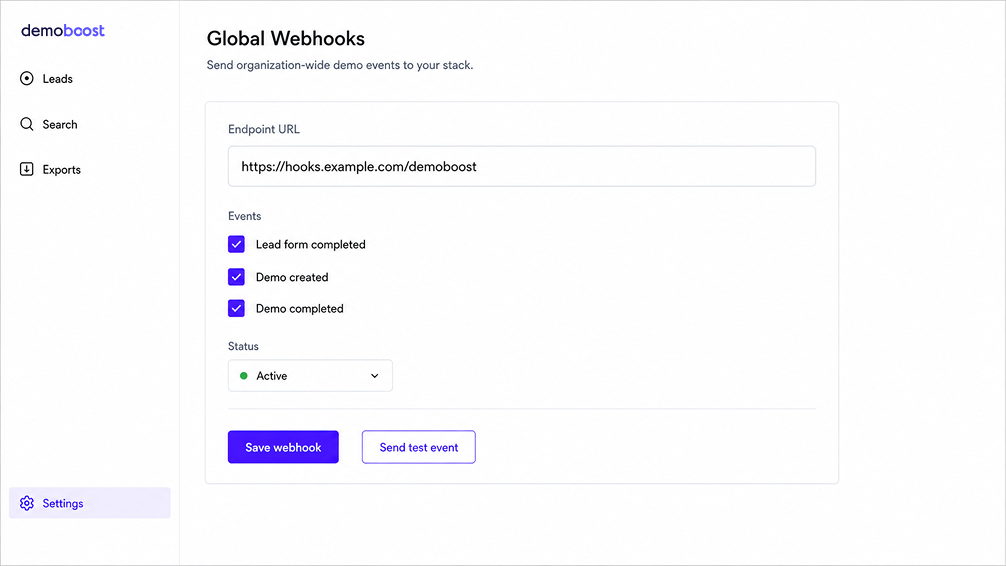
One org-wide webhook configuration routes lead form completed, demo created, and demo completed events into your stack.
It is worth being precise here, because the market is loose with the word. Demoboost does not use a native CRM connector. The data moves through webhooks and middleware, which is what lets it reach almost any destination instead of a fixed list of two or three. For most teams that is the more flexible arrangement, not the lesser one.
The point of Revenue Intelligence is action, not another dashboard to admire. A few concrete starting moves:
Presales: Watch which leads turn warm, then open their journey before the call. If someone completes a technical use-case demo and returns to it, that is a better use of an SE's time than a cold intro call, and the drop-off point tells you which objection to lead with. Our task-by-task presales guide goes deeper on where to spend the hours AI frees up.
Marketing: Use demo behavior to build retargeting and nurture around the specific product area a buyer explored, rather than dropping every visitor into the same audience. A completed use-case demo deserves a follow-up that continues that story.
RevOps: Route the webhook data into CRM fields so lead scoring, lifecycle triggers, and pipeline reporting all draw on real product interest instead of form fills alone.
In keeping with the rest of this series, it is worth drawing the line honestly.
AI genuinely helps on the input side. It makes demos cheap enough to run everywhere, which is what produces engagement data at a volume worth analyzing in the first place. No demos, no signal. AI also helps sort and summarize that signal so a human does not have to read every session by hand.
Where the hype creeps in is the promise that AI will interpret buyer intent for you and tell you exactly who will close. It will not, at least not reliably. Engagement is a strong signal, but it is still a signal, not a verdict. The teams that win with Revenue Intelligence are the ones who use the data to point human judgment at the right accounts faster, not the ones who expect the software to make the call for them. The prize is better prioritization, not fewer decisions.
1. What is Demo-Led Revenue Intelligence in Demoboost?
It is the layer that captures demo engagement and turns it into a view of buyer interest. It identifies leads through lead forms and assigns each lead a score of hot, warm, or cold based on what they did inside your demos.
2. How does Demoboost score leads?
Every lead receives a lead score of hot, warm, or cold based on their demo behavior, such as completions, return visits, and progression through use-case flows. Identification is separate from scoring: a lead becomes identified when they complete a lead form, which tells you who they are, while the score tells you how engaged they are.
3. Does Revenue Intelligence work at the account level?
The current release focuses on lead-level intelligence. Revenue Intelligence organizes and scores individual leads from demo activity.
4. How does demo engagement data get into my CRM?
Through Global Webhooks. One org-wide webhook configuration fires on lead form completed, demo created, and demo completed, and sends data to your CRM and other tools through middleware such as Zapier, Make, or Workato. There is no native CRM connector.
5. How is demo data different from form fills or third-party intent?
Form fills and intent feeds tell you someone engaged with your brand. Demo engagement tells you what they cared about once they saw the product, which makes it a stronger input for lead scoring and prioritization.
6. Can I export the data?
Yes. You can export the current Leads view to CSV, with a confirmation once the file is ready.
This is the last article in our series on the state of AI in demo automation. Start from the beginning:
Book a live demo to see how Demoboost helps your team cut demo prep time, qualify buyers faster, and focus on real opportunities.
Book a Live Demo

.png)
.png)
